

Aquatic Artists custom waterfall
Categories
Flow

How we use AI to draft small business blog posts

You’re reading a post that an AI helped write. I want to be upfront about that. I also want to tell you exactly what “helped write” means, because there’s a version of this that’s embarrassing and a version that actually works – and the difference is one step that most people skip.

This week we shipped “The Flow,” the small business blog you’re reading right now. The whole publishing platform was built by our AI system. The first thirty posts were drafted by it. Every single one of them was reviewed and approved by a human – me – before it went anywhere near a publish button.

That approval gate matters more than anything else I’ll say in this post. But let me back up.

Why small business content kept getting postponed

We do good work. We build water features that people are genuinely proud of, and we have a craft approach that’s worth talking about. But content takes time. Writing a solid post about, say, why granite weathers differently in freeze-thaw climates takes a couple of hours of focused work – and that’s on a day when you’re not also managing a job site.

I’d had “start the blog” on my list for two years. It kept losing to things that had to happen today.

What changed this month: we finished building a blog service that’s part of our own AI platform. It generates draft posts from a creative brief, applies our brand voice guidelines, runs them through a quality check, and queues them for human review. The drafts come out rough in spots. They need editing. But for a contractor or small business owner, “rough draft that needs editing” beats “blank page” every time.

Here’s how this works in practice: I write a brief. The system drafts. I read it, edit what’s wrong, kill what doesn’t sound like me, approve what does. Nothing publishes without that pass. If I don’t approve it, it doesn’t run. That’s not a technicality – it’s the actual workflow, and it’s why I’m comfortable with it.

If you’ve seen AI content that sounds like it was written by no one, for no one, about nothing – that’s what happens when the human review step gets skipped. The AI doesn’t have opinions. It doesn’t know your customers. It doesn’t know the specific thing about boulder placement that makes your work different from the next guy’s. That part is still yours, and it has to go back in during the edit.

Compliant business texting for customer follow-up

While I’m pulling back the curtain this week, I want to mention something else we finally got sorted: compliant business texting.

If you’ve tried to send appointment or follow-up texts from a business number in the last year or two, you may have noticed messages getting blocked. That’s because the phone carriers tightened the rules around what they call A2P messaging – application-to-person – which covers any texts your business sends through software.

The registration process is called 10DLC (10-digit long code). Plain English: you register your business number and confirm to the carriers that you’re a real business texting people who’ve agreed to hear from you. There’s paperwork and a few days of waiting, but it’s a one-time thing.

Once approved – ours came through this week – texts reliably arrive again. Appointment reminders, job confirmations, follow-ups. We’d been routing a lot of this through email. Email works, but short, actionable customer messages are often better over text for a field-services business. Worth the paperwork.

A shop dashboard for jobs, weather, and crew decisions

The third piece we shipped this week is the one my team actually talks about when they walk past the conference room: a TV on the wall showing the whole business at a glance.

Weather for the week, because a lot of our install decisions hinge on it. Where the trucks are. How our social posts are performing. Job status. A few metrics that used to mean opening four different tabs on a laptop.

It sounds simple, and it is. But having all of it visible at once – in the spot where the team gathers each morning – changes how people talk about the day. They ask different questions. They notice things earlier. You don’t realize how much you missed until it’s there.

We also pushed a smaller version to a Raspberry Pi kiosk at the front of the shop. Customers see weather and job status updates when they come in. Low-key, but something to look at.

Where AI content automation ends and editing begins

The tools are getting better, and that is genuinely good. I use ChatGPT, Claude, Gemini, and different coding tools because each one has strengths and weaknesses. I also do not pretend any of them are infallible.

Better does not mean hands-off. The blog you’re reading involved real editorial judgment, not just automation. Some posts needed a light pass. A few I rewrote from scratch because the draft missed the point. The AI is a capable first-pass writer with no taste, no field experience, and no relationship with our customers. I bring those things. The combination works. The automation alone wouldn’t.

Same goes for the texting. Automated messages with typos, wrong names, or tone-deaf timing damage your reputation. We review templates before they go live. We test before we send. The automation handles volume and timing – not judgment.

Where to start with AI-assisted content

If you’ve been putting off a content or communication task because it feels too big for your bandwidth, it’s worth asking whether the draft step is what’s actually stopping you.

AI is reasonably good at drafts. It’s not good at approval. That part requires someone who knows the business, cares about the reputation, and is willing to say “that’s not right, fix it.” If you’re willing to be that person for your own content, the blank-page problem gets a lot smaller.

Start with one post or one email template. See if having a draft to react to changes how fast you finish the thing.

That’s what changed for us. Two years of “I should start a blog” became a blog.

Categories
Flow

Renting cloud GPUs for AI video by the hour

At some point last year I looked up what it actually costs to run AI video processing on hardware you own. A workstation spec’d for serious AI video work – the kind that handles upscaling and frame interpolation without turning into a space heater – runs $8,000 to $12,000. That’s before you factor in that it would sit idle for most of the year. Most of our video projects are assisted with AI, but not fully generated using AI. The math does not work for a small contractor.

The computing power AI video needs is genuinely enormous. When I tried running an upscaling job on my regular laptop, the fan spun up like a jet engine and the machine was unusable for anything else. Two hours in, the job was maybe a third done. I killed it. That’s not a workflow – that’s an obstacle.

The problem isn’t that the tools don’t work. They work well. The problem is that the hardware underneath them is built for studios and research labs, not for a shop that wants to polish forty minutes of jobsite footage before a client presentation. Nobody running a waterfall, pool, or landscape business is going to drop five figures on a workstation they’d use twenty times a year.

Cloud GPU rental works like renting a lift

Cloud GPUs work like equipment rental. A GPU, short for graphics processing unit, is the specific kind of chip that handles heavy video and AI work. The big tech providers have warehouses full of them, and they’ll let you use one for an hour or a day, then hand it back.

We hooked our AI video pipeline into a remote job broker. That’s a piece of software that takes a heavy task, sends it to a rented GPU in a data center somewhere, runs it, and ships the finished file back to us. The whole thing looks like a button click on our end. We pay for the compute time we actually used. For a forty-minute AI video upscaling job, that’s a few dollars, not a few thousand.

AI upscaling takes a lower-resolution video and rebuilds it at higher quality using pattern recognition. The model has seen enough video to make educated guesses about what the missing detail should look like. Frame interpolation adds smoothed frames between the original ones, so slow-motion footage looks cinematic instead of choppy. Neither one is magic, but both are real, and the results are good enough to put in front of clients.

We also do AI thumbnail generation and SEO scoring for our YouTube channel through the same setup. The video marketing work that used to take a morning now runs overnight in the cloud while nobody’s watching.

Why we test AI automation in a sandbox

The other thing we built around the same time is what I call a sandbox, and rented GPUs are part of what makes that practical. A sandbox is a separate environment where the AI can try things without touching the actual business systems. Instead of buying hardware for experiments that might not work, we can rent the compute for a test, run the job away from production, and shut it down when we’re done.
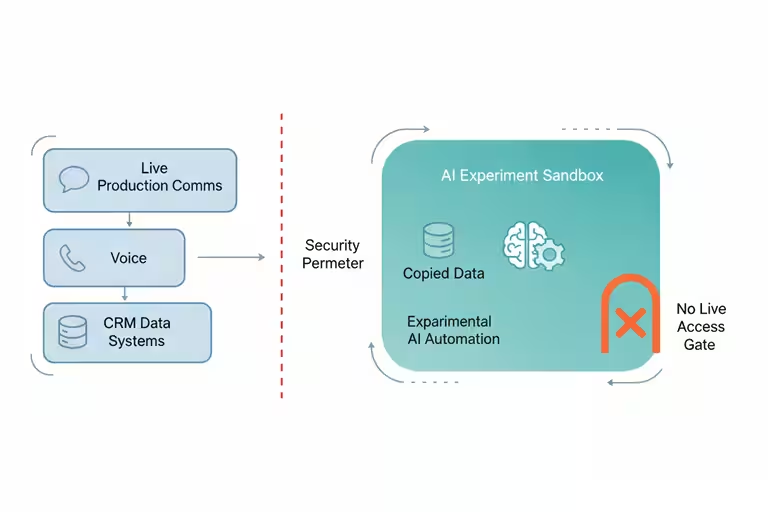
Think of it like this. You have a real kitchen where you prep food for customers. You wouldn’t test a new recipe using the same station where tomorrow’s orders are staged. You’d use a separate prep area, or come in on a Sunday when the restaurant is closed. The sandbox is that separate prep area, but for software.

When we want to try a new AI automation, whether that’s a new way to draft proposals, a new way to route incoming calls, a video model, or anything that might behave unexpectedly, we run it in the sandbox first. For heavier tests, that sandbox can use a rented GPU just like the video pipeline does. It has its own copy of the data it needs, its own services, no connection to the live CRM or the real phone system. If it does something wrong, it does something wrong in a corner nobody can see, and we are only paying for the compute while the test is running. We review the results, tweak the settings, and only then move it to production.

The reason this matters is that AI tools are genuinely useful and genuinely unpredictable in roughly equal measure. An AI assistant that can draft a solid follow-up email can also, under the wrong conditions, send one to the wrong person. The sandbox is the rule we made so that “wrong conditions” means “caught in testing,” not “already in a customer’s inbox.”

What cloud AI tools mean for a small business

For us, the practical payoff splits into two pieces.

The video side means our marketing footage actually gets used. We had a backlog of good jobsite video that was too rough to publish. The cloud GPU pipeline cleared it out over a couple of weekends without anyone sitting at a computer. The finished clips go on the website, on YouTube, in proposals. Good waterfall video sells waterfalls.

The sandbox side means we move faster on experiments without lying awake about what might go wrong. Before we had it, every new automation felt like a judgment call about risk and hardware commitment. Now the rule is simple: new things go in the sandbox, rented compute handles the heavy test, and tested things go in production. That structure made it easier to say yes to new ideas and easier to explain to Chuck what we were building and why.

Where cloud GPU jobs still need a safety net

Cloud GPU work needs a solid internet connection and a pipeline that knows what to do when a job fails midway – which happens. Our setup retries automatically, but if you’re running a one-off job with no error handling, a dropped connection means starting over.

The sandbox also isn’t a substitute for actually reviewing what the AI does. It catches catastrophic failures, the kind where something clearly went wrong. It doesn’t catch subtle errors, like an AI that’s technically doing the right thing in the wrong context. A human still has to look at the output before it ships. We check the video before it goes on the website. We review the AI responses before they go live. The sandbox just means the review happens on our schedule, not after a customer already saw something we’d rather have caught.

The AI space is busy right now. There are free trials, promos, new tools, and demos everywhere. What I’ve found is that the tools we use every week pay off, and the tools we tried once and forgot are just clutter. For us, AI video cleanup and thumbnail work made sense because we already had the footage and a real place to use it. That is the test I would use before signing up for anything: do I have a real workflow for this, or am I just curious?

If you have a backlog of real work and there’s an AI tool that can help, that’s a good place to start. It’s fun to try things out and learn what’s new in the AI world, but at the end of the day AI is only valuable if it’s doing valuable work. The compute is there. You just don’t have to own it.


Categories
Flow

Why your small business emails land in spam

We spent a Friday afternoon building out a small business email campaign for Aquatic Artists – wrote decent copy, put together a clean template, hit send to a list of a few hundred contacts we’d accumulated over years of doing business. Then we waited.

Almost nothing came back. No opens worth counting, no replies. A few days later, I started getting the occasional “never got your email” from people I knew well. The emails hadn’t bounced. They’d gone straight to spam.

That’s a deflating experience. And it’s not rare. If your contractor emails, service reminders, or marketing emails keep going to spam, here is what I learned about why it happens and the fixes we put in place.

Email authentication: the part most small businesses skip

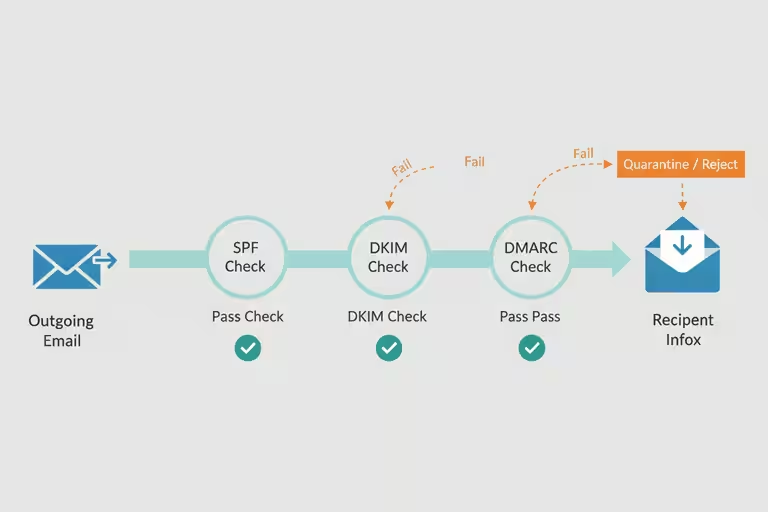
Most small businesses set up an email address, maybe connect it to a domain they bought, and assume it’s ready to go. The problem is that spam filters run a series of background checks on every message before it reaches an inbox. Three of those checks matter most:

SPF is a record you publish for your domain that says “these are the servers allowed to send email on my behalf.” If your email goes out through a service that isn’t on that list, spam filters treat it as suspicious. Think of it like a contractor showing up to a job site without being on the authorized crew list.

DKIM is a cryptographic signature attached to your message – a way of proving it wasn’t tampered with in transit. Most email platforms add this automatically, but only if you’ve set it up correctly in your domain’s settings.

DMARC tells receivers what to do if SPF or DKIM fail: quarantine the message, reject it, or just report it. Without DMARC, even a properly signed email can end up treated inconsistently.

None of this is exciting. Setting up SPF, DKIM, and DMARC is mostly a couple of hours in your DNS settings and your email platform’s configuration panel. But it’s the foundation that everything else depends on.

Plain-text email helps deliverability

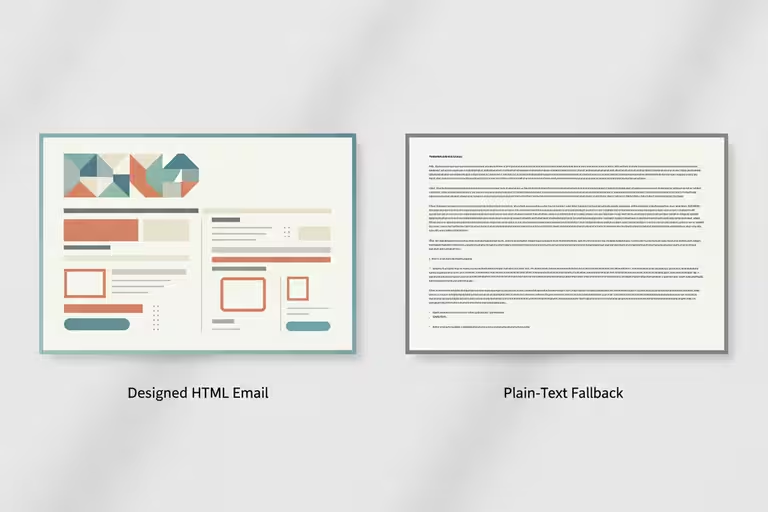
Here’s one that surprised me. If you send a marketing email that’s only HTML – a nice-looking newsletter with images and formatting, but no plain-text version alongside it – spam filters often mark it down. Real communication between people almost always has a plain-text component. A message that’s pure HTML looks like it came from a bulk-sending machine, not a person.

When we built our email template editor, we made it generate both versions automatically. Every campaign goes out with a proper HTML design and a plain-text fallback. It takes zero extra effort and removes one more reason a filter might catch your message.

Domain warming for business email

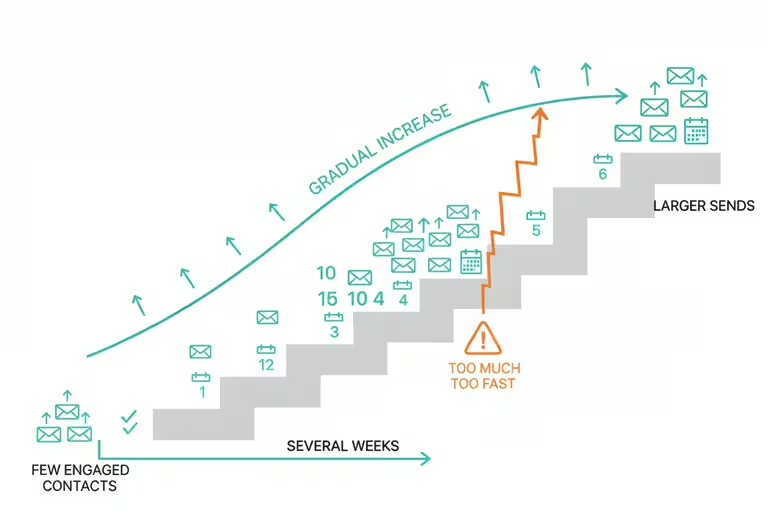
If you’ve never sent marketing email from a domain before – or haven’t sent much – spam filters are going to be cautious about you. You don’t have a reputation yet. The fix is to build one slowly: start by sending small batches to your most engaged contacts (people who actually open and click), then increase volume over several weeks. This is called domain warming, and it’s genuinely boring. There’s no shortcut.

Double opt-in helps here too. When someone signs up to hear from you and then confirms that signup with a second click, you know they actually want your emails. That keeps your complaint rate low, which keeps your sender reputation healthy.

Where AI helps with email marketing

Once the plumbing was working, we added two things that make the system smarter.

First, the template editor I mentioned is drag-and-drop, roughly what you’d expect from a Mailchimp-style tool, with AI suggestions for subject lines and send times based on which days and hours your audience tends to engage. Not magic, but genuinely useful when you’re doing this as one of fifteen things on your plate.

Second, we built an inbox scanner. It’s an AI tool that reads the incoming mailbox and surfaces the actual leads and action items buried in there. Not “here’s every email you got,” but “here are the three threads that look like someone wants to talk business.” For our business, that matters more than fancy automation. That is the kind of AI I like: boring, specific, and tied to a real job that used to eat time.

What email authentication alone won’t fix

Authentication fixes are necessary but not sufficient. If your content looks spammy – all-caps subject lines, aggressive promotional language, sending to people who never asked to hear from you – you’ll still land in filters regardless of your DKIM record. And domain warming takes weeks. There’s no fast version.

The other rule we follow is simple: do not use AI as an excuse to send vague, pushy, or unwanted messages. If the email would annoy you as a customer, making the computer send it faster does not improve it. It just scales the mistake.

What I’d check first

If you’re not sure whether your domain is authenticated, use a domain checker instead of guessing. Start with Google Admin Toolbox Check MX for MX/SPF checks and DKIM selector checks, MXToolbox SuperTool for MX, blacklist, SMTP, SPF, DKIM, DMARC, MTA-STS, and TLS-RPT lookups, dmarcian Domain Checker for SPF, DKIM, and DMARC inspection, or EasyDMARC Domain Scanner for a domain health scan across SPF, DKIM, DMARC, and BIMI. Run more than one if the result matters, because each tool explains failures a little differently. You’ll see quickly whether SPF, DKIM, and DMARC are configured. That’s the starting point. Fix what’s missing, then think about content and warming. The deliverability problems tend to sort out in that order.

If you’re curious how we handle email marketing for our business, reach out. Happy to share what worked.

Categories
Flow

Website automation for Project Pages

There’s a photo on my phone of a waterfall we finished last fall. Great install. The kind of job you want on your website. I took about forty photos on-site, picked the best three, and then set them aside because getting them onto the website meant sitting down, opening three different tools, resizing images, filling in fields, writing a caption, and publishing – and I had six other things on my list.

The photos sat for two weeks.

That’s not a technology problem. That’s a friction problem. The harder you make something to do, the more often it doesn’t get done. And for a small shop, your website is your portfolio. If it doesn’t reflect your recent work, you’re leaving your best sales tool half-empty.

What publishing a Project Page used to look like

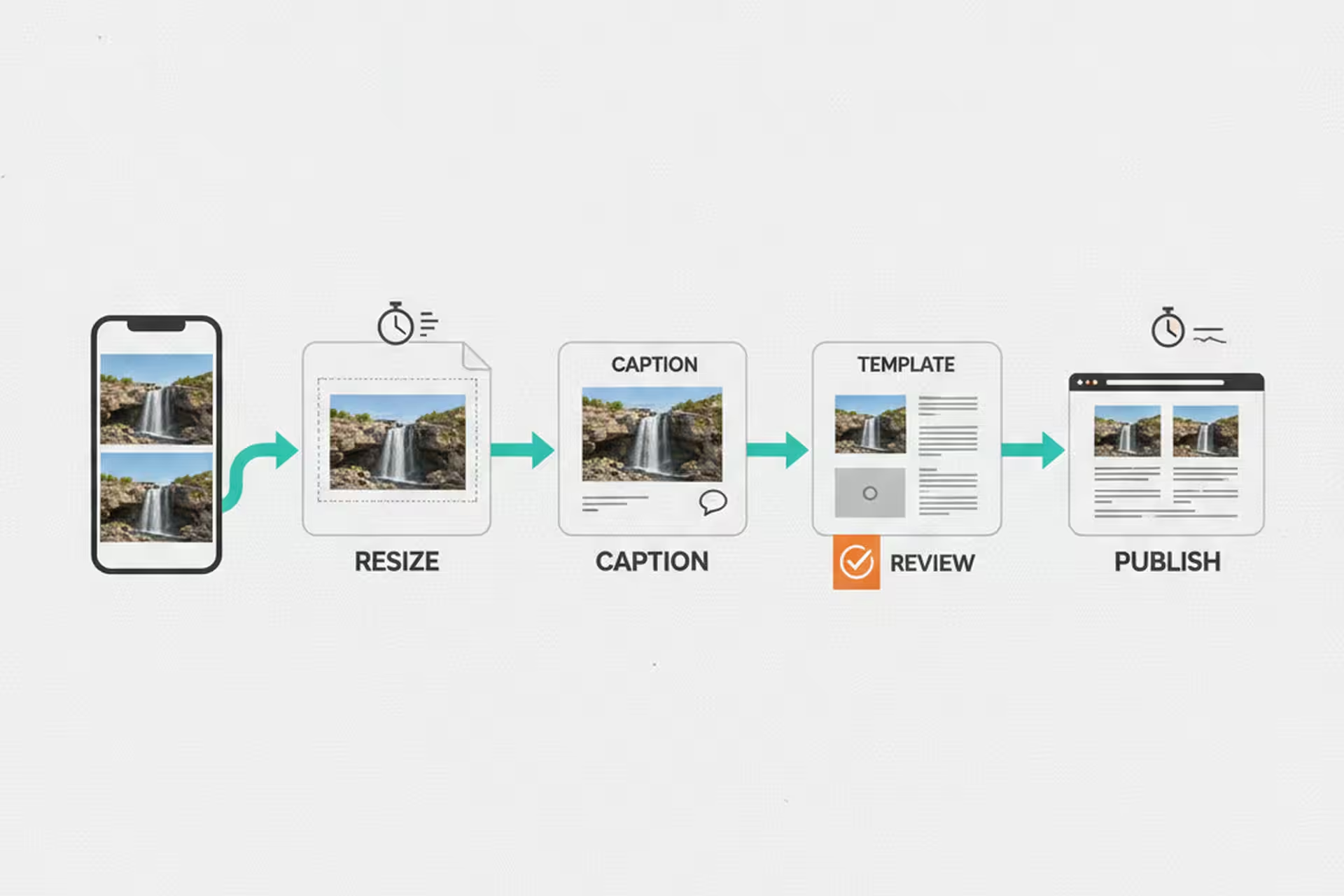
Before we built our website management system, getting a finished install onto the site went something like this: open the WordPress admin, create a new post, upload images one at a time, resize or crop as needed, write a title and description, assign categories and tags, check that the gallery template looked right, preview it, fix whatever was off, and publish. Then separately update the portfolio index.

From start to finish, about 15 to 20 minutes – on a good day, when nothing went wrong.

That may not sound like a full afternoon. But multiply it by every project we do in a year, and it adds up to a real chunk of time. More importantly, it’s the kind of task where friction wins. You do it when you have a clear desk and a focused hour. Which means it often doesn’t happen at all.

What website automation changed

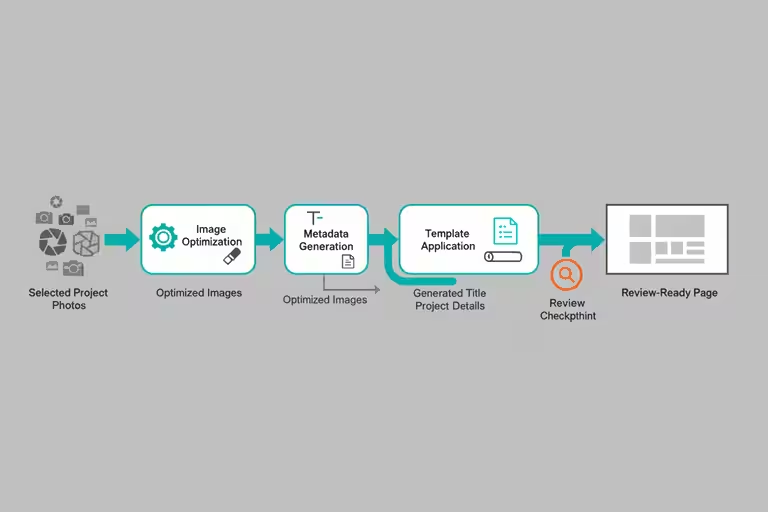
We built a custom website editor that handles the whole project publishing workflow in one place. You pick the photos, the tool handles resizing and optimization, it generates a title and pulls in the project details we’ve already entered elsewhere, it sets the right template, and it publishes. The whole thing takes under a minute now.

The difference isn’t that the computer is working faster. It’s that we eliminated the switching – jumping between tools, re-entering information that already existed somewhere, hunting for the right image dimensions. The automation handles the steps that were only ever annoying busywork.

The time savings that compound most reliably for a small business are usually the boring ones. Shaving 15 minutes or more off a task you do every week. Removing the friction that caused you to skip updating your portfolio for two weeks straight. Nobody writes headlines about that, but it’s where the real time goes.

The YouTube and SEO workflow

We also built a YouTube management tool on the same principle: remove the friction from getting project content onto the channel.

The piece I find most useful is the AI thumbnail draft. When you publish a new video, the tool proposes a thumbnail based on the project photos and the title. It’s not always perfect – you still need a human eye on it before it goes live – but having a draft to react to is much faster than staring at a blank canvas and thinking about what to make. Most of the time the draft is 80% of the way there, and I’m adjusting rather than creating from scratch.

The SEO scoring layer checks the title and description against what tends to perform well in search – not in a black-box way, but by flagging specific things: title too long, description missing key terms for a Project Page, that kind of thing. Again, a guide, not an oracle. But useful enough that I actually use it instead of skipping the step because it feels like too much work.

My honest take is that you do not need to chase every AI update for this kind of work. Pick a friction point in your own operation and remove it. In our case, that meant getting good project photos out of my phone and onto the website before they got buried. Better tools help, but they help a lot more when you have already built the habit of using them.

What small-business automation still can’t do for you

Automation handles the steps that are well-defined and repeatable. It doesn’t replace judgment.

The AI thumbnail draft still needs a human look before it goes live. The SEO suggestions are starting points, not guarantees – what ranks well shifts, and a tool trained on last year’s patterns isn’t always right about this year’s. Publishing automation means nothing if the underlying content is weak or the photos are poor quality.

There’s also a real risk of automating too fast. We’ve had moments where the system published something with a formatting issue that looked fine in preview and wrong on the live page. Automation moves fast, and fast is useful only if you still have a review step before the thing is public.

The rule we follow: automate the tedious parts, keep a human eye on anything that touches the customer-facing result.

The math worth doing

If your shop does fifty Project Pages a year, and each one takes 15 to 20 minutes, that’s about 12 and a half to nearly 17 hours. Cut it to under a minute, and you’ve saved roughly 12 to 16 hours – which matters even more when you remember that those hours weren’t all in one block. They were fifteen minutes here, twenty minutes there, scattered across a year of days when you already had too much on your list.

The real savings aren’t the time. They’re the jobs that actually make it onto your portfolio instead of sitting in a folder for two weeks.

If you’re managing your own contractor website and marketing, even basic tools – a photo-resize shortcut, a template that fills in the repetitive fields – can make a real difference in whether you actually do the thing or skip it. Start with the step that causes the most friction. That’s usually where the time is hiding.