

Aquatic Artists custom waterfall
Categories
Flow

Website monitoring found five false alarms and one real bug

The website monitor went off at 6 a.m. Something was wrong with one of our sites. I pulled up the alert, looked at the flagged section, and everything looked fine to me. I closed the laptop and went back to my coffee.

That happened six times over two weeks. Five of those times, I was right to dismiss it. The sixth time, I was wrong – and a real bug had been sitting there, visible to customers, for longer than I’d like to admit.

When website monitoring alerts cry wolf

We run automated website monitoring that checks our sites regularly and flags anything that looks off. It compares page sections against a baseline – layout, content, key elements. When something drifts far enough from the baseline, it fires an alert.
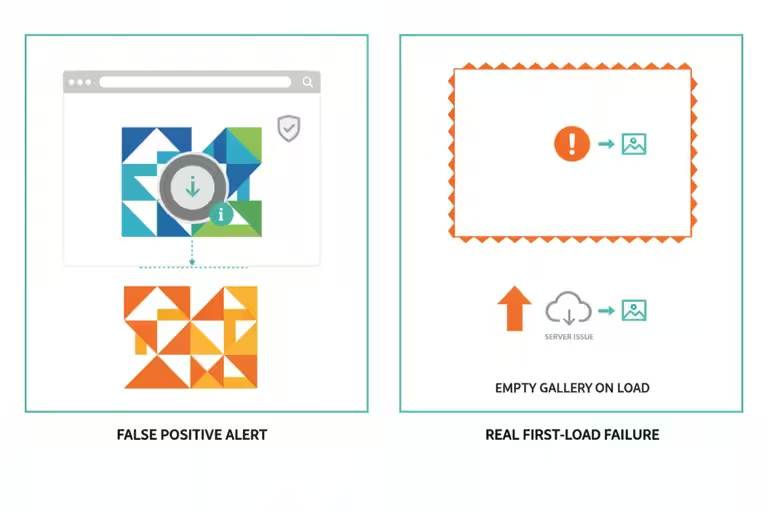
The problem is that not every change is a problem. A font loads slightly differently on a Tuesday. An image swaps out because we updated the gallery. The comparison tool sees the difference and sends the alarm. Five of our six recent alerts fell into that category: legitimate changes the monitor didn’t recognize as intentional.

The issue with that pattern is obvious. Once alerts fire often enough for non-problems, you start dismissing them faster. Your response time to a real issue quietly gets worse.

So we dug into every one of those six alerts properly, traced each one back to its actual root cause, and fixed the detection logic where it was overly sensitive. That part is maintenance work. Not exciting. Worth doing.

The real bug: a project gallery failed on first load

The sixth alert pointed to a project gallery section – the part of a page that shows photos of completed work. When I loaded the page and clicked around, it looked fine. Images loaded, captions appeared, everything worked.

What I hadn’t done was run a first-load website test: load the page fresh and just wait.

A customer who lands on that page for the first time, scrolls to the gallery section, and doesn’t immediately click on anything – they would have seen a blank space. The gallery wasn’t rendering on initial page load. It only appeared after some interaction triggered a refresh.

We’d been testing from inside the system, navigating page to page while logged in. The bug only appeared when you came in cold, the way a real visitor does. Once we loaded pages fresh from outside, the issue was obvious. Fix took less than an hour once we understood it.

The lesson: test from the outside. Your workflow and your customers’ workflow are not the same path.

Backup verification has to check the destination

During this same debugging window, we found something unrelated but equally worth writing about.
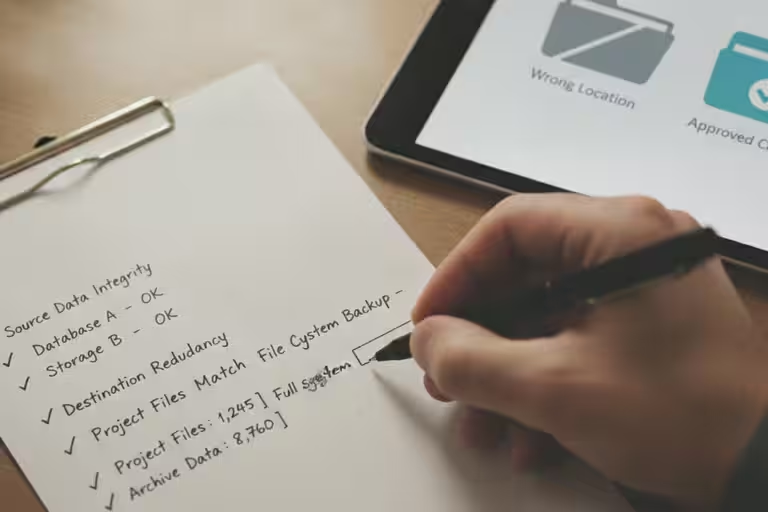
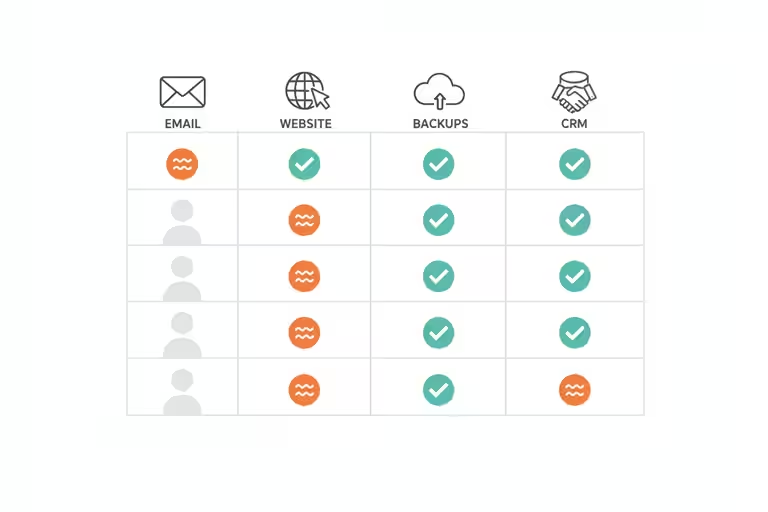
Our automated backups were running. They were completing. They reported success. But we hadn’t looked closely at where the files were actually landing. When we checked, they’d been routing to the wrong cloud account – one we had access to, technically, but not the right destination for a real recovery scenario.

For weeks, our backups were “working” – no error ever appeared. But if we’d needed to restore something, we’d have been digging in the wrong place under pressure.

The rule we wrote after this: backups must fail in a way you notice, not succeed in a way you never verify. An automated process that completes quietly and routes output somewhere wrong is worse than one that breaks loudly. A loud failure gets fixed. A silent mismatch can sit there for months.

Now our backup jobs verify destination and file count as part of their completion check. If the numbers don’t match expectations, the alert goes to a human. Not a log entry. A human.

Verify backups before website upgrades

In the same week, we upgraded WordPress to version 7.0. New security patches, compatibility updates, the usual.

The rule before any significant website upgrade is simple: confirm the backup exists and that you can actually restore from it, then proceed. Not “I think the backup ran.” Confirm it. Pull a recent file from it.

The upgrade went fine. But that discipline is what makes an upgrade something you do on a Tuesday afternoon instead of scheduling a Saturday for it. A verified backup means a bad upgrade is a two-hour recovery, not a crisis.

Using an AI coordinator without giving it the keys

One more thing worth explaining: we started using an AI coordinator we call “jefe.” The name is intentional. Jefe’s job is to direct, not to do.
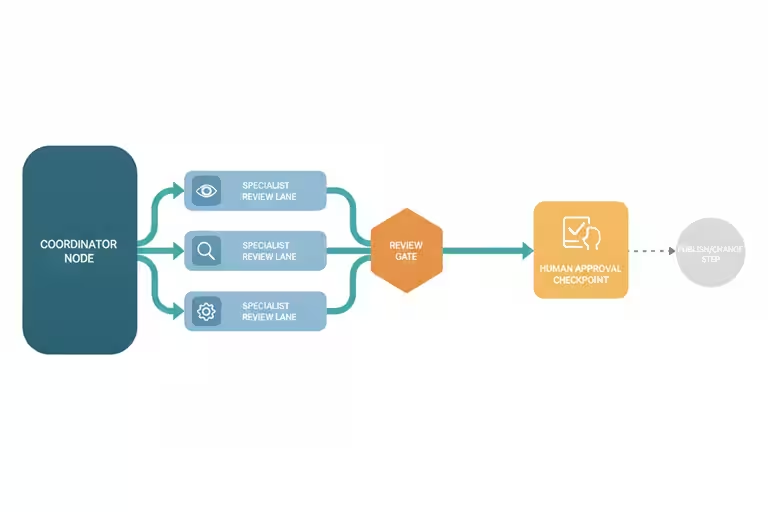
When we have a complex task, jefe breaks it into pieces, assigns each piece to a specialized AI assistant, and collects the results. It never edits a file or makes a change directly. It only coordinates.

I built it this way because I watched what went wrong when a single AI assistant tried to handle too many things at once: mixed-up context, lost steps, fixes from one area getting applied to problems in another. One coordinator plus focused specialists plus a human reviewing the output works noticeably better than one assistant trying to do everything.

The structure matters more to me than whichever model happens to be newest that week: a director that does not touch the work, specialists that stay in their lane, and a human who checks before anything ships. That is how I keep AI useful without letting it run the business by itself.

Tuning monitoring alerts lowers noise but adds risk

Jefe can delegate to the wrong specialist, or two specialists can return conflicting answers. The human review step isn’t optional or a formality. More than once, the consolidated report has included a finding that was just wrong, and a human caught it.

The monitoring tuning is also not a permanent fix. Reducing false positives means the thresholds are less sensitive, which means a real issue might take slightly longer to trigger. We accepted that tradeoff deliberately and will revisit it if something slips through.

Check one automated business process this week

Pick one automated process in your business this week – a backup job, a scheduled report, a recurring email – and check the actual output, not just whether it ran. Did the backup land where you expected? Does the file open? Is the report showing the right data?

This takes about five minutes. It has saved us more than once.
Categories
Flow

How we used AI audits for SEO, social media, and security

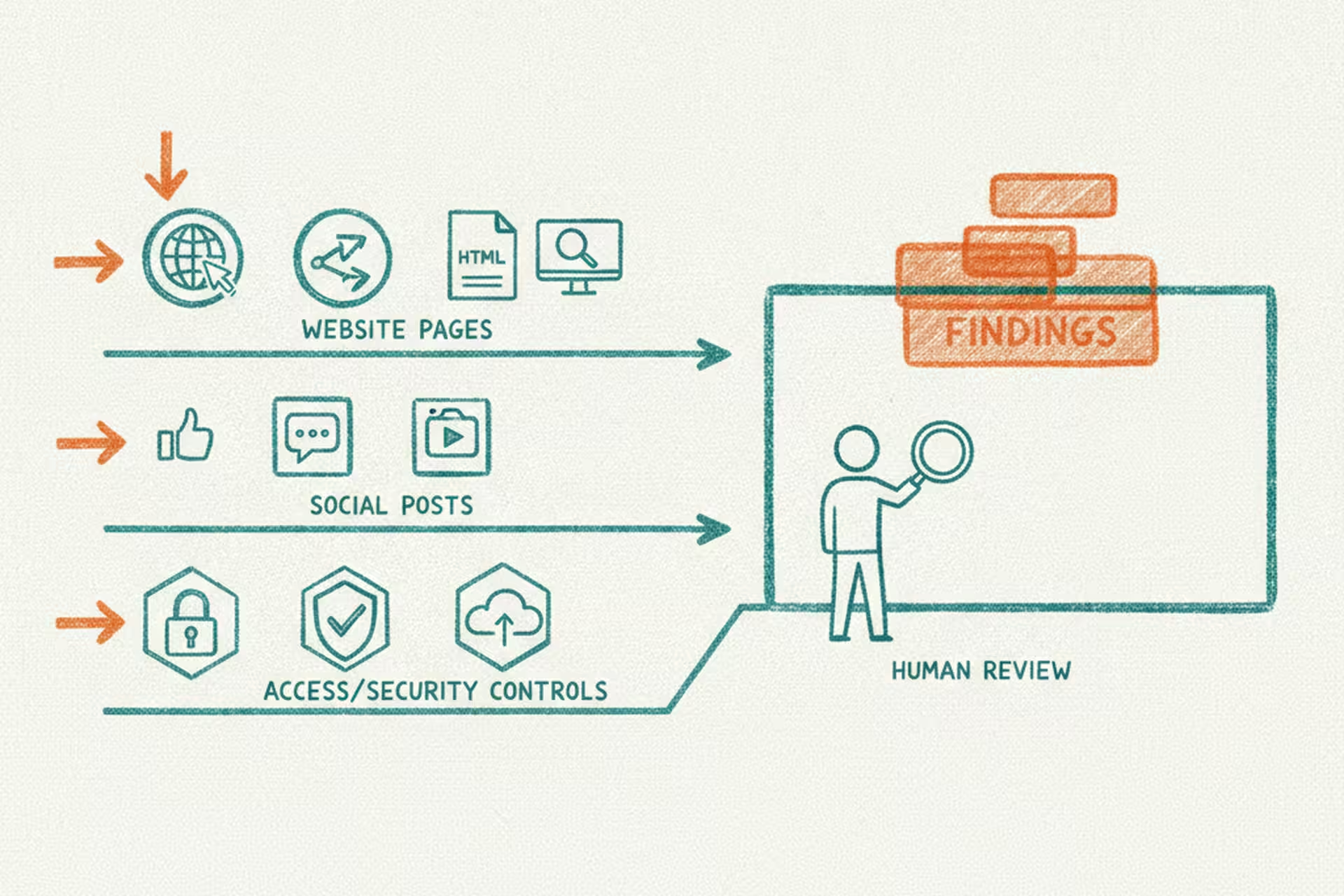
Over a couple of days in early June, I pointed AI assistants at three separate corners of our operation: our websites, our social media history, and our security configuration. They worked through the night. By morning I had prioritized lists of findings across all three areas: website SEO, content patterns, and access risks.

What we got back was useful. What the experience taught us about how to use AI for this kind of work was more useful.

A website SEO audit across 325 pages

Between our two companies, we have a lot of web pages. Product pages, project galleries, service descriptions, blog posts. I honestly don’t know the last time anyone sat down and systematically checked whether they were all set up well for search, especially the project pages a homeowner or facility manager might find while comparing contractors.

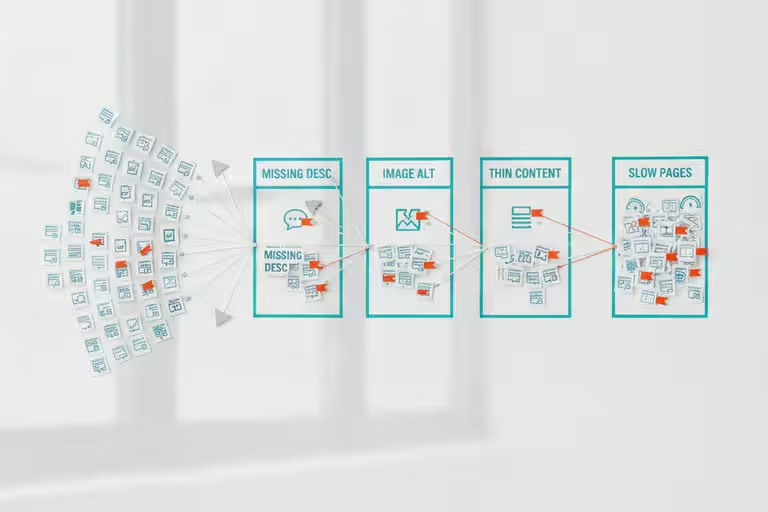
We ran an AI assistant through both sites – more than 325 URLs – and had it flag every page with a missing description, a title that was too long or too short, images without descriptive text, thin content, or pages that were slow to load. It worked through them methodically and produced a queue of small-business SEO findings.

Here’s the part that matters for how we set this up: the AI flagged and queued every issue. It did not change anything on its own. Before a single word changed on any page, a human reviewed the finding and approved the fix.

That gated approval step sounds like extra work, and honestly, it is a little. But an AI assistant that can edit your website without asking is a liability wrapped in a convenience. For anything customer-facing, the pattern we use is: the AI proposes, a human approves, then the AI executes. That sequence gives you the efficiency of automation without the risk of waking up to a homepage that now says something you didn’t intend.

A social media content audit

Separately, we had a team of AI agents review two months of posts across our social channels: what was getting engagement, what was falling flat, what felt off-brand, and what was redundant with something we’d already said.

We used sixteen agents working through the archive in parallel, each covering a slice of the content. Not because you need sixteen AI assistants to read Instagram posts, but because splitting the work that way meant we got results in minutes instead of waiting for one agent to work through everything sequentially. A human read the consolidated summary and made the actual decisions.

The findings weren’t dramatic. A few things we’d guessed were confirmed. A few patterns we hadn’t noticed showed up clearly. One recurring theme: posts that led with a specific project detail consistently outperformed posts that led with a general statement about what we do. Good to know, and costs nothing to act on.

A security and access review

The third audit was less glamorous but probably the most important: a sweep of our credentials, configurations, and access controls. For a trades business, that still matters. Customer information, email accounts, website logins, and backup destinations are all part of the operation now.

We set up 14 AI investigators to work through 14 categories simultaneously: which accounts had unnecessary access, whether any old access credentials were still active, whether backup configurations were pointed at the right destinations. Each investigator produced a finding. A human reviewed the consolidated report and triaged what needed fixing.

Fourteen findings came back. We fixed what needed fixing. None of it was catastrophic, but several things had drifted over time into states we wouldn’t have chosen deliberately. The kind of quiet accumulation that happens when you’re focused on building and not on auditing.

Why I used several AI audit assistants

One thing I have learned using AI is that different models and different prompts behave differently. AI is great, but it is not infallible. Sometimes the answer is correct for a different situation than the one you are actually in. Sometimes one assistant catches what another one misses.

That is why we split the audit into specialists. One looked at SEO. One looked at social posts. One looked at access and security. Then a human read the combined report. The value was not that one giant AI knew everything. The value was that several focused passes gave me better raw material to judge.

AI audit findings still need human judgment

AI audits surface findings, not wisdom. An SEO tool will flag every page with a description under a certain length, but sometimes a short description is intentional. A security scan can’t replace a human who understands your specific business context: what’s sensitive, what’s legacy by design, what the acceptable tradeoffs are.

Use the list as a starting point, not a checklist to execute blindly. The AI found 14 security items. A human had to decide which 14 mattered in what order, and whether any of them were false positives. Two of them were.

The same applies to SEO findings. More words on a page isn’t always better. A recommendation is a recommendation, not an instruction.

Start with a simple website SEO audit

If you haven’t looked at your website’s SEO setup in the past year, that’s a reasonable first project. Most website platforms (WordPress, Squarespace, Wix) have free or low-cost SEO audit tools you can run yourself without any AI involved. PageSpeed Insights from Google is free and takes about 30 seconds.

If you find more than you want to tackle alone, that’s exactly what the SBDCs are for.

Categories
Flow

One master price list, frozen customer quotes

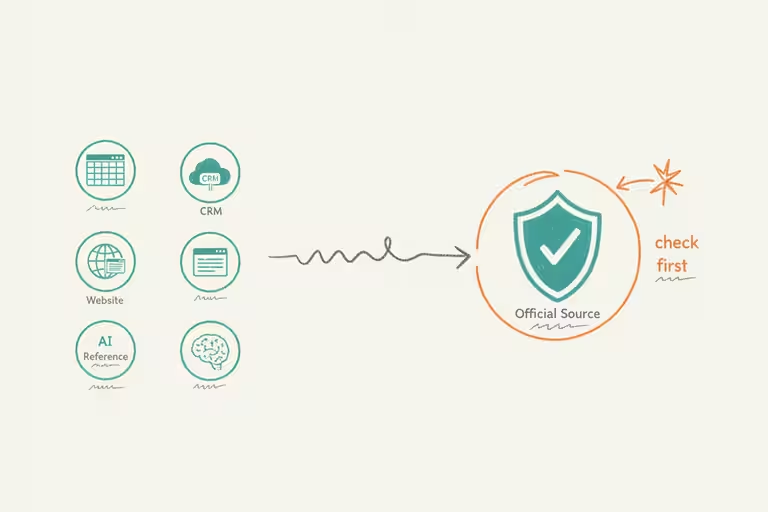
A customer called to confirm a proposal we’d sent a few weeks earlier. Simple question: “Is that price still good?” I should have been able to answer in five seconds. Instead I spent two minutes cross-referencing three different places while she waited on the line: our CRM (the software we use to track customers and jobs), an older pricing spreadsheet, and whatever our AI assistant had on file from its last sync.

None of them matched exactly. That was the problem.

Why small-business pricing drifts across systems

When you run a small business or contracting company, pricing has a way of multiplying across systems. The original lives in a spreadsheet. Someone pastes a copy into the customer-tracking software. The AI assistant learned from a snapshot that’s now three months old. The website shows a range nobody has updated since last year. None of this is careless. It’s just what happens when you’re moving fast and there’s no rule about where the number officially lives.

The drift is slow and mostly invisible. Until a customer catches it.

Make one master price list the source of truth

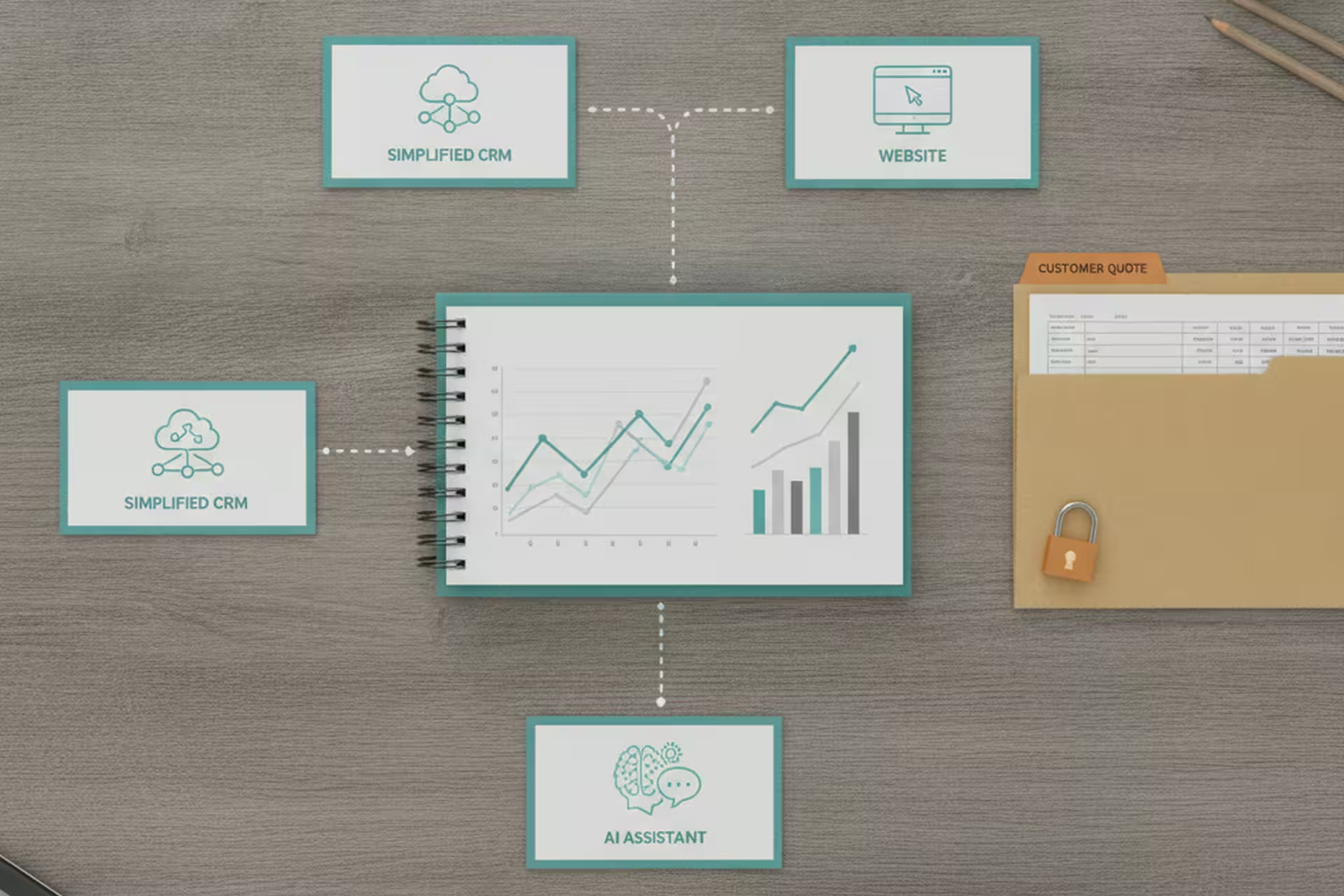
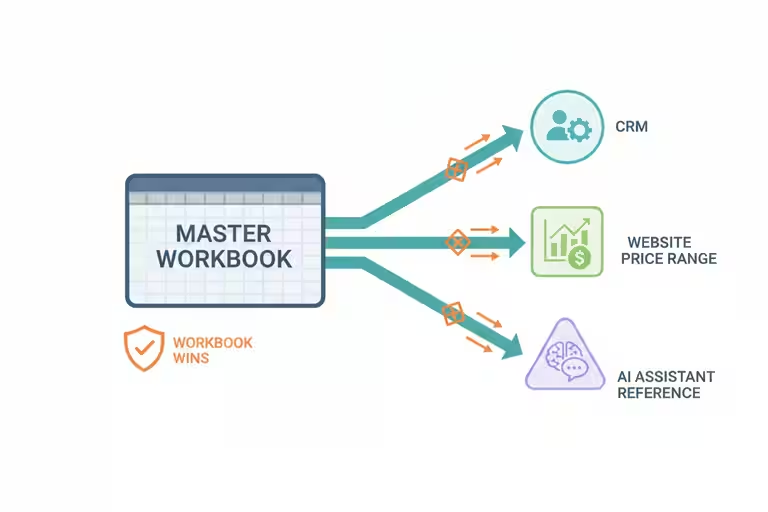
We settled on a rule: the master Excel workbook is the source of truth. Every price in every other system has to trace back to that one file. The AI assistant reads from it and doesn’t fill in numbers on its own. The CRM syncs from it. If there’s ever a conflict, the Excel wins.

People in tech call this a “single source of truth.” The plain-English version: there is exactly one place where the right answer lives, and every person and every tool knows to check there first.

Getting there required cleanup. We went through the customer-tracking software and removed duplicate product rows that had crept in over time. We reconciled the project gallery pricing with what was in the workbook. It took a few days of careful work. After that, the AI’s answers stopped drifting.

Freeze customer quotes after they leave the shop

While we were doing this reconciliation, we found something that made us stop cold.

Saving a project record in the CRM was silently pulling in the current live price for each line item – even on records that already had a customer-facing quote attached. So a job we’d quoted to a customer at last month’s pricing could have its numbers quietly updated to today’s pricing the next time anyone opened and saved that record. No warning. No change log entry in plain sight. The numbers just changed.

We fixed the bug. But we also made a quote-management policy that doesn’t depend on the code being perfect: a line item that has been quoted to a customer is frozen. The AI cannot touch it. A human has to deliberately override it if circumstances genuinely require a change, and that action gets logged.

The principle generalizes to any business that sends proposals. Once you’ve told a customer a price, that price is a commitment. Your systems need to treat it that way, not leave it open for automated updates to drift through.

Website speed matters while customers compare quotes

While we were cleaning up the data layer, we also pushed both of our websites past 90 on Google’s PageSpeed test. It sounds like a technical metric, but the practical effect is real: slow pages lose visitors before they’ve read a word. Some fixes were straightforward – image compression, removing a few scripts that were loading before the page content. Others took a little more digging. Worth it.

Speed is one of those things that doesn’t feel urgent until you realize a potential customer bounced in the two seconds your homepage was loading.

AI pricing tools need pinned source data

I use more than one AI model because each platform has strengths and weaknesses. One might be better at coding, one might be better at writing, and one might reason through a messy problem better on a given day. That is useful, but it also means the instruction has to be clear and the data has to be pinned down.

If the tool is reading from the master spreadsheet correctly, a model change should not cause price drift. If the instruction is vague and the source is stale, you are asking the AI to improvise with customer money. That is not a place I want improvisation.

Automation still needs a maintained price list

The AI syncing to the master spreadsheet only works if someone maintains the master spreadsheet. If prices change and nobody updates the workbook, the AI will confidently quote the old number right up until a customer points out the problem.

Automation doesn’t remove the responsibility to keep your data current. It just makes the consequences of not doing so more consistent – and therefore more visible when something goes wrong.

A simple pricing audit to run first

Pick the single most-quoted price in your business. Find every place that number lives. Write down which one is official. If you can point everyone – and every tool – at that one place, you’ve closed a gap that causes more small-business headaches than most people realize.

If you’ve already done that, check when it was last updated. The master list is only as good as the last time someone touched it.

Categories
Flow

How we use AI to draft small business blog posts

You’re reading a post that an AI helped write. I want to be upfront about that. I also want to tell you exactly what “helped write” means, because there’s a version of this that’s embarrassing and a version that actually works – and the difference is one step that most people skip.

This week we shipped “The Flow,” the small business blog you’re reading right now. The whole publishing platform was built by our AI system. The first thirty posts were drafted by it. Every single one of them was reviewed and approved by a human – me – before it went anywhere near a publish button.

That approval gate matters more than anything else I’ll say in this post. But let me back up.

Why small business content kept getting postponed

We do good work. We build water features that people are genuinely proud of, and we have a craft approach that’s worth talking about. But content takes time. Writing a solid post about, say, why granite weathers differently in freeze-thaw climates takes a couple of hours of focused work – and that’s on a day when you’re not also managing a job site.

I’d had “start the blog” on my list for two years. It kept losing to things that had to happen today.

What changed this month: we finished building a blog service that’s part of our own AI platform. It generates draft posts from a creative brief, applies our brand voice guidelines, runs them through a quality check, and queues them for human review. The drafts come out rough in spots. They need editing. But for a contractor or small business owner, “rough draft that needs editing” beats “blank page” every time.

Here’s how this works in practice: I write a brief. The system drafts. I read it, edit what’s wrong, kill what doesn’t sound like me, approve what does. Nothing publishes without that pass. If I don’t approve it, it doesn’t run. That’s not a technicality – it’s the actual workflow, and it’s why I’m comfortable with it.

If you’ve seen AI content that sounds like it was written by no one, for no one, about nothing – that’s what happens when the human review step gets skipped. The AI doesn’t have opinions. It doesn’t know your customers. It doesn’t know the specific thing about boulder placement that makes your work different from the next guy’s. That part is still yours, and it has to go back in during the edit.

Compliant business texting for customer follow-up

While I’m pulling back the curtain this week, I want to mention something else we finally got sorted: compliant business texting.

If you’ve tried to send appointment or follow-up texts from a business number in the last year or two, you may have noticed messages getting blocked. That’s because the phone carriers tightened the rules around what they call A2P messaging – application-to-person – which covers any texts your business sends through software.

The registration process is called 10DLC (10-digit long code). Plain English: you register your business number and confirm to the carriers that you’re a real business texting people who’ve agreed to hear from you. There’s paperwork and a few days of waiting, but it’s a one-time thing.

Once approved – ours came through this week – texts reliably arrive again. Appointment reminders, job confirmations, follow-ups. We’d been routing a lot of this through email. Email works, but short, actionable customer messages are often better over text for a field-services business. Worth the paperwork.

A shop dashboard for jobs, weather, and crew decisions

The third piece we shipped this week is the one my team actually talks about when they walk past the conference room: a TV on the wall showing the whole business at a glance.

Weather for the week, because a lot of our install decisions hinge on it. Where the trucks are. How our social posts are performing. Job status. A few metrics that used to mean opening four different tabs on a laptop.

It sounds simple, and it is. But having all of it visible at once – in the spot where the team gathers each morning – changes how people talk about the day. They ask different questions. They notice things earlier. You don’t realize how much you missed until it’s there.

We also pushed a smaller version to a Raspberry Pi kiosk at the front of the shop. Customers see weather and job status updates when they come in. Low-key, but something to look at.

Where AI content automation ends and editing begins

The tools are getting better, and that is genuinely good. I use ChatGPT, Claude, Gemini, and different coding tools because each one has strengths and weaknesses. I also do not pretend any of them are infallible.

Better does not mean hands-off. The blog you’re reading involved real editorial judgment, not just automation. Some posts needed a light pass. A few I rewrote from scratch because the draft missed the point. The AI is a capable first-pass writer with no taste, no field experience, and no relationship with our customers. I bring those things. The combination works. The automation alone wouldn’t.

Same goes for the texting. Automated messages with typos, wrong names, or tone-deaf timing damage your reputation. We review templates before they go live. We test before we send. The automation handles volume and timing – not judgment.

Where to start with AI-assisted content

If you’ve been putting off a content or communication task because it feels too big for your bandwidth, it’s worth asking whether the draft step is what’s actually stopping you.

AI is reasonably good at drafts. It’s not good at approval. That part requires someone who knows the business, cares about the reputation, and is willing to say “that’s not right, fix it.” If you’re willing to be that person for your own content, the blank-page problem gets a lot smaller.

Start with one post or one email template. See if having a draft to react to changes how fast you finish the thing.

That’s what changed for us. Two years of “I should start a blog” became a blog.

Categories
Flow

How we stopped our AI assistant from making things up

A few months back, I was testing one of our voice agents – the AI assistant that handles customer calls – and asked it a basic question about one of our waterfall systems. The kind of thing a customer might ask on any Tuesday afternoon.

It answered confidently. It got the price wrong by a few hundred dollars.

That’s a serious problem. A customer hears a friendly voice quote them $3,200 for something that actually runs $3,800, and now you’ve got an awkward conversation to have. Or worse, they book the job expecting that number and you have to unwind it after the fact.

The issue has a name: AI “hallucination.” I want to explain what that actually means, why it happens, and what we did to fix it – because AI accuracy is the single biggest trust question any small business needs to answer before putting an assistant in front of customers.

What an AI hallucination actually means

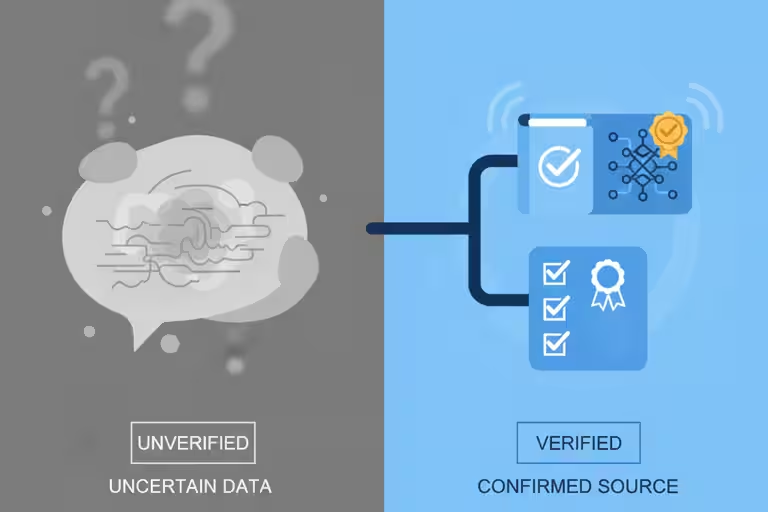
When an AI assistant gives you a wrong answer delivered with complete confidence, that’s a hallucination. It’s not lying. It genuinely doesn’t know it’s wrong. Most AI tools learn from enormous amounts of text and get very good at sounding plausible. “Plausible” and “accurate” are different things.

This ties back to something I have said in our AI videos: artificial intelligence is not actually intelligent in the human sense. It is very good at language. It is very good at finding patterns. That can make it sound more certain than it should.

For general questions that don’t matter much, a wrong answer is an annoyance. For a quote, a product spec, or a scheduling commitment, it’s a reputation problem.

The fix: a company knowledge base the AI checks first

Think of it this way. A new office assistant who’s never set foot in your shop might still sound knowledgeable – they’ve read a lot. But if you ask them what the current price is for a Cascade Series installation, they’ll guess based on general patterns, not your actual numbers.

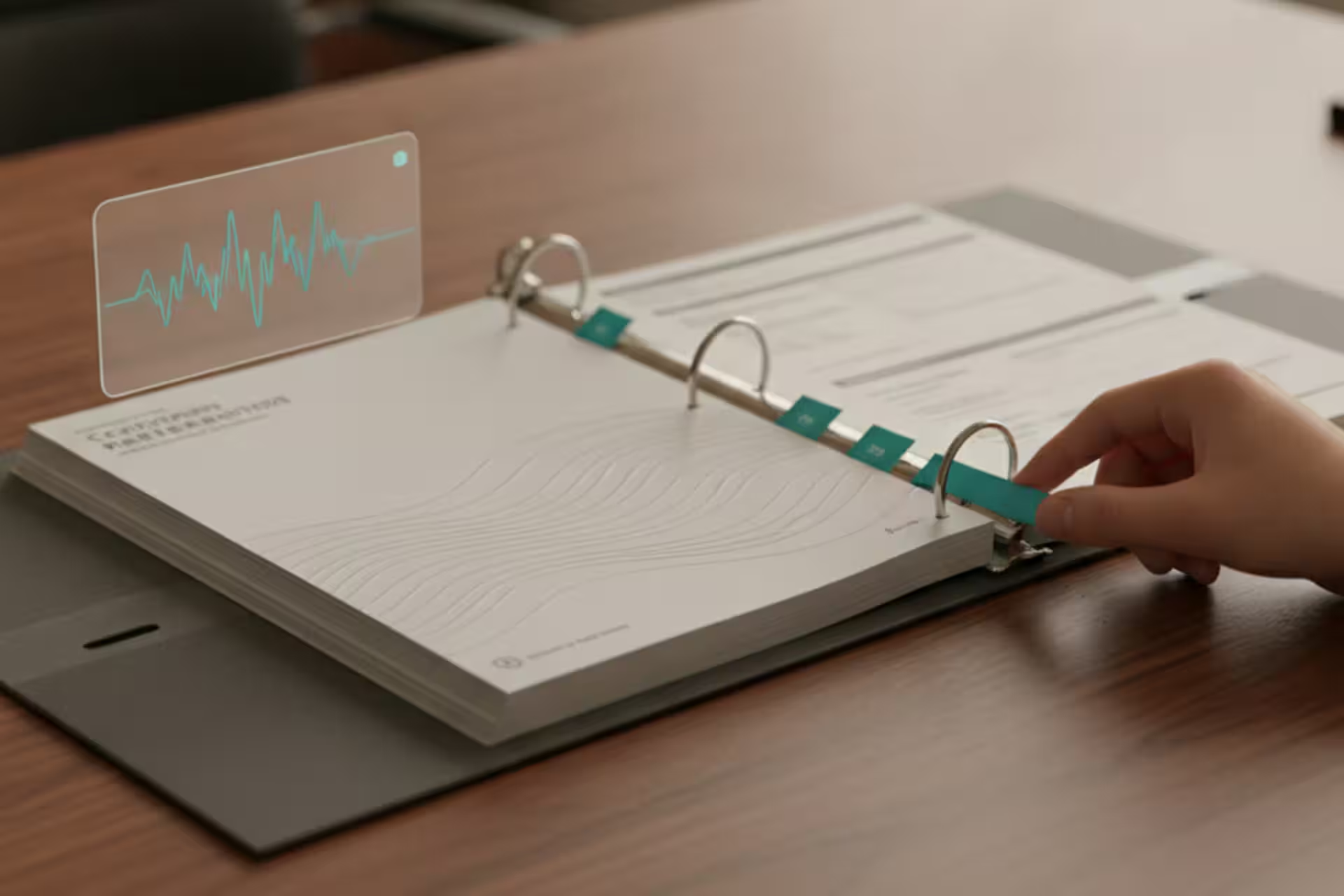
The fix is simple: give them a reference binder. Your price sheets. Your product specs. Your standard install notes. Now when someone asks about pricing, they look it up instead of guessing.

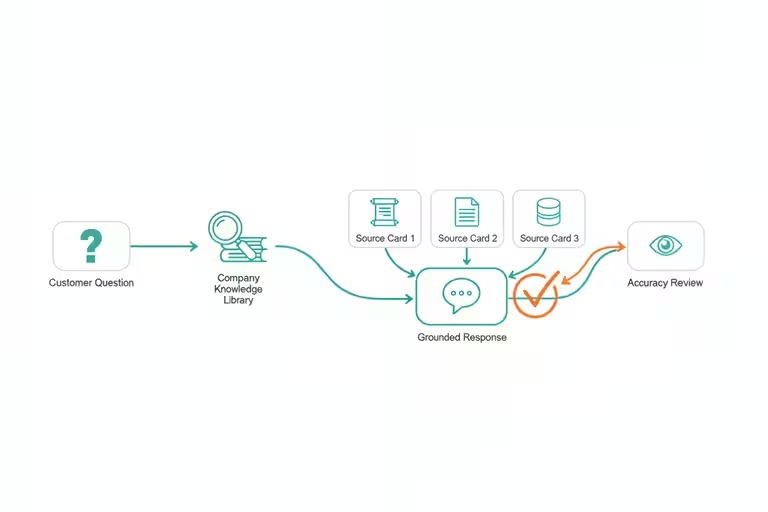
That’s exactly what we built. The technical term is retrieval-augmented generation – RAG for short. You don’t need to remember the acronym. What matters is the concept: before the AI answers a customer question, it searches a curated library of real, current company information and uses what it finds to ground its response. Think of it as giving the AI a filing cabinet of your own business to check before it opens its mouth.

We built what I’d call an encyclopedia of our operation. It covers our product catalog, pricing, common install specs, typical timelines, crew schedules. We maintain it, keep it current, and the AI reads it before it speaks.

The difference was immediate. Same AI, same voice, same friendly tone. But now when a customer asks about a Formal Series waterfall for a commercial project, the answer comes back accurate, not invented.

How accurate business data helps voice agents act

Once the knowledge base was solid, something else opened up: the voice agents could start actually acting on what they know.

I tested this last week – asked the system out loud to check a day’s schedule and drop an install job on a crew’s calendar. “Put the Henderson job on Crew 2 for Thursday.” It worked. Needed a little coaching on ambiguous phrasing, but it worked.

That’s meaningful for a service business. A crew lead who can confirm a Thursday install by talking to the phone – instead of trading texts with the office – saves real time across a week. The underlying reason it works: the AI has accurate schedule data to read and write against. Without the knowledge base, it would be guessing. And a scheduling guess that gets acted on is worse than no answer at all.

Better AI models still need your company information

The tools are getting faster and more capable. That is good news. I use them every day, and I would not be spending this much time on AI if I did not think the value was real.

But a better model does not automatically know Aquatic Artists pricing, our install process, our product differences, or the way we want to explain something to a contractor. That still requires the work we did: giving the system real information to draw from.

What a knowledge base can’t fix

The knowledge base helps a lot. It’s not a guarantee.

If the information in the library is out of date, the AI will give an out-of-date answer with exactly the same confidence it gives a current one. We run scheduled jobs to keep things fresh, but no automated system catches everything. Someone has to own the maintenance.

We also keep a firm rule: anything that touches a quote or a commitment to a customer gets a human check before it goes out. The AI can draft it. A person confirms it. That’s not a knock on the technology – it’s just the right call. The customer’s trust is on the line, and that’s not something to hand off entirely.

Think of it this way: the AI is a well-read assistant with your reference binder open on the desk. Faster than the alternative, genuinely useful. Still benefits from someone checking the work on the things that actually matter.

Where to start with AI accuracy

If you’re thinking about putting any AI tool in front of customers – for quotes, for scheduling, for answering service questions – ask one thing first: what does it have to read?

If the answer is “nothing specific to my business,” that’s the gap. That’s where the hallucinations come from.

The single most valuable thing you can do before deploying an AI assistant is give it a solid, current, maintained source of your own business information. It doesn’t have to be sophisticated. A well-organized set of product sheets and a current price list is a real start. From there, you build.

If you want to talk through what that would look like for your operation, reach out. The knowledge-base work is some of the least glamorous and most valuable thing we’ve done this year.

Categories
Flow

Moving our AI platform without business downtime

Picture moving your whole shop across town over a weekend. Every tool, every piece of equipment, every file cabinet. Monday morning your crew shows up and everything is where it belongs. Nobody missed a call. Nobody lost an estimate. The customers have no idea anything happened.

That’s what we pulled off last week with our AI platform, and I want to tell you about the boring work that made it possible – because business downtime is not an abstract technology problem when your phone, CRM, and job schedule all depend on the same system.

Why AI platform reliability matters

Most AI coverage focuses on the visible wins. Voice assistants. Automated quotes. Smart scheduling. That stuff matters, and it does save real hours.

What rarely gets mentioned is the infrastructure underneath it. Moving a platform that handles customer calls, CRM data (that’s the contact and job database – your digital Rolodex), voice agents, and automated tasks to brand-new hosting is nerve-racking. One misconfigured server, one missing database file, one deploy that lands on the wrong machine – and you’re explaining to customers why nobody picked up the phone on Tuesday.

We had been running our operation on one hosting setup for a while. It worked, but we’d grown: more services, more data, more things that mattered. The new hosting was faster and better spec’d. But knowing it’s the right move and actually making the move without breaking anything are two very different problems.

The backup and recovery prep that saved us

Here’s what we did before we touched a single live system.

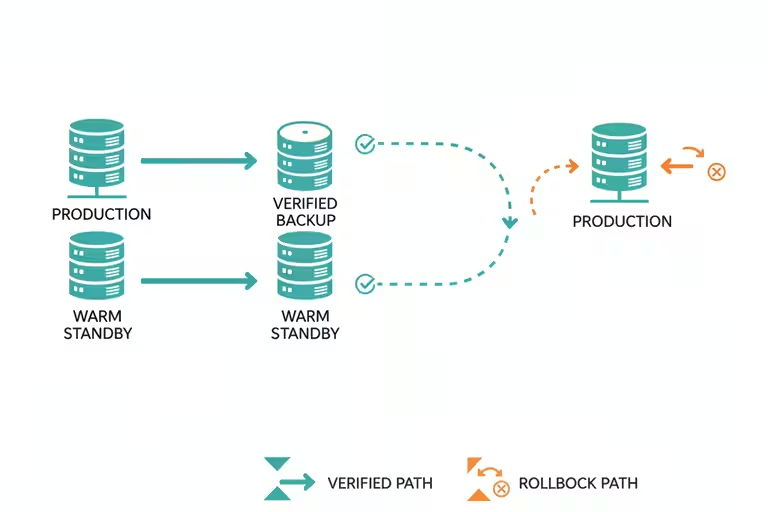
Backups, then backups of the backups. I know that sounds obvious, but I mean current, tested backups – not the ones you set up six months ago and assumed were running. We verified every database, every recording, every config file. If we had to roll back, we’d be rolling back to something real.

A warm standby. Think of this like staging a second crew truck with all the same tools. The new server was fully configured and tested weeks before the cutover. We ran it in parallel, not live, until we were confident.

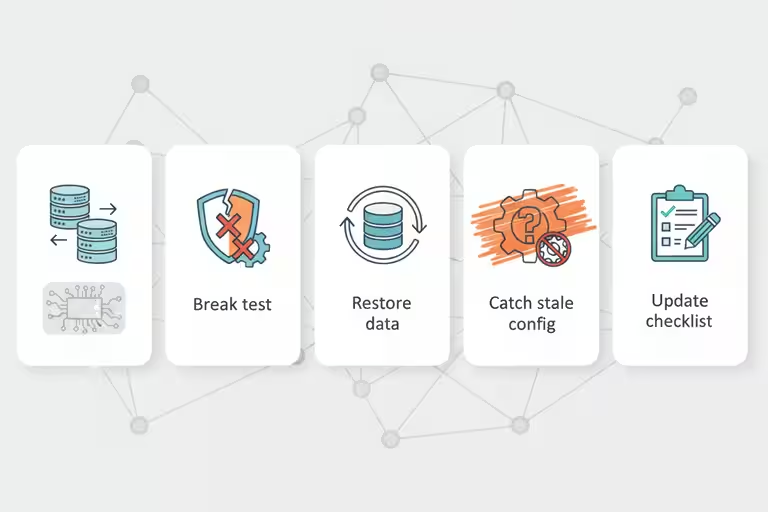
Disaster-recovery drills. This is the one most shops skip. We actually practiced the restore. Not on the real system – on a copy. We blew it up on purpose and timed how long it took to come back. You do not want the first time your team runs a backup restore procedure to be during an actual emergency.

Here’s the moment that made me glad we ran the drill. Halfway through the practice restore, the voice-agent database came back up but pointed at the wrong config file – a leftover from the old server setup. The agents started, looked healthy, and would have answered calls with stale routing rules. On a test copy, that’s a finding. On cutover day with customers calling, that’s an incident. We caught it, fixed the config, documented the step, and added it to the checklist. Forty minutes of drill time, potentially hours of customer-facing grief avoided.

Host-aware deployment. When you’re managing multiple servers, you can end up in a situation where a deploy – think of it like sending a new version of a tool to your crew – lands on the wrong machine. We labeled everything so the system knows which server it’s talking to and refuses to run a job on the wrong host.

Think of it like color-coded key tags on a truck fleet. The red tag goes with Truck 1, the blue tag goes with Truck 2, and if someone grabs the wrong keys the ignition won’t turn. That’s roughly what this does for software. It sounds simple. It prevents a whole category of expensive mistakes.

What happened during the hosting migration

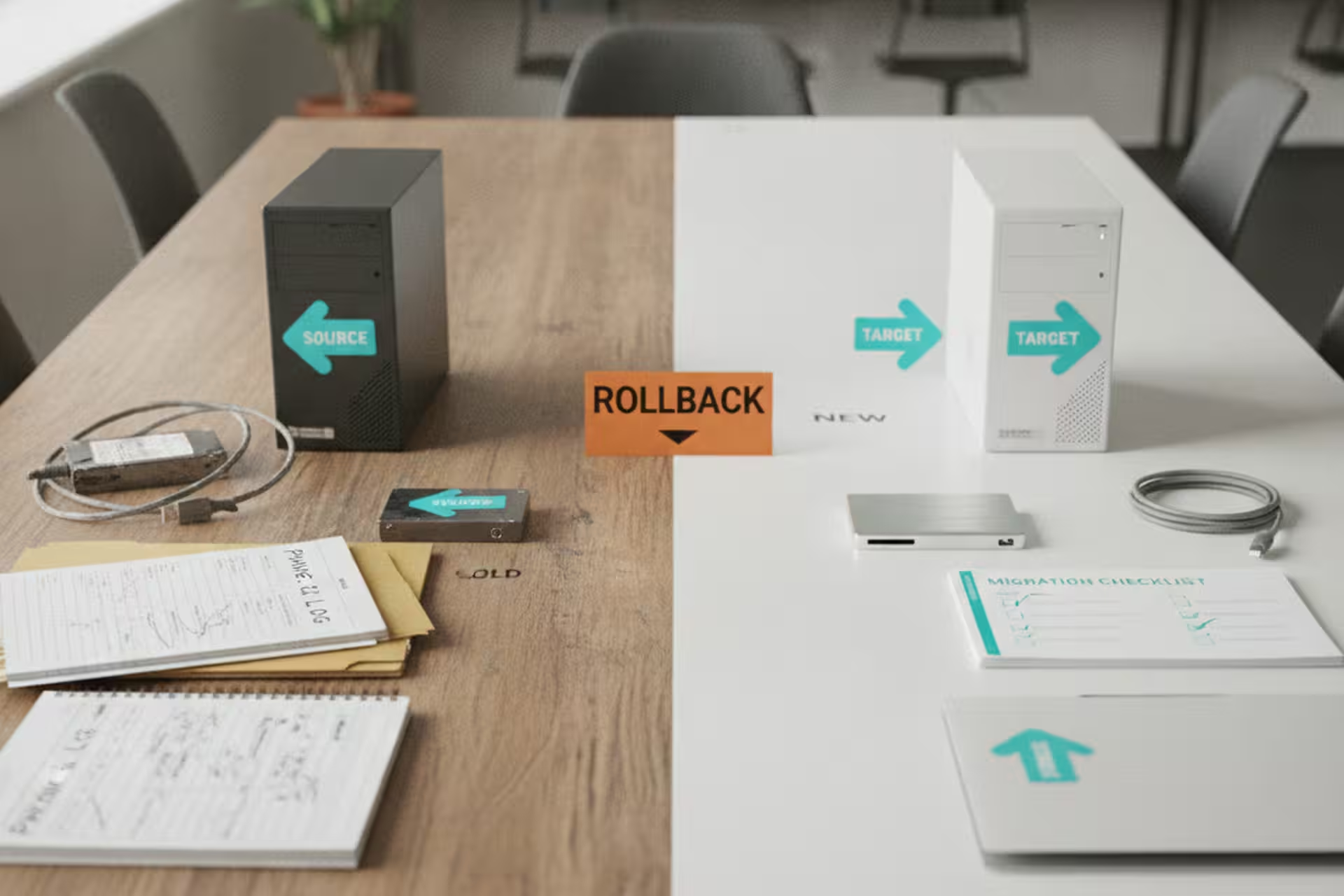
We moved on a Saturday. We had a checklist, we had a rollback plan, and we’d tested both. By Sunday afternoon, everything was running on the new platform. Voice agents answering calls. CRM accessible. Automated jobs running on their usual schedule.

Monday morning: no customer emails asking why something was broken. No missed calls showing up in the logs. Nothing. The migration was invisible from the outside, which is exactly what you want.

What downtime planning still won’t protect you from

I won’t pretend this was quick. The prep work I described above took several weekends. Backups had to be verified, not just assumed. The warm standby had to be configured correctly, not just spun up. The DR drills took time to design and run.

If you skip the prep and just move, you’ll probably be fine. Until you’re not. And the day you’re not is the day a customer calls and nothing answers, or an estimate goes missing, or a payment doesn’t process. At that point you’re not thinking about how much time the prep would have taken. You’re thinking about how fast you can fix it.

The boring work is what keeps the phones, quotes, and crews moving.

A downtime checklist for a small business

If your business runs on any software you depend on – scheduling, CRM, phone system, website – find out when the last backup ran and whether anyone has ever tested the restore. Not “does a backup exist.” Does the restore actually work.

That’s the question that matters. And most small businesses don’t know the answer until something breaks.

If you want to talk through what a simple backup-and-recovery approach looks like for a shop your size, reach out. It’s one of those things that’s less complicated than it sounds once you’ve done it once.

Categories
Flow

Cleaning up AI-generated code after the robot ships

I’m going to tell you something that doesn’t make it into most AI hype pieces: after a big AI-assisted development sprint, you open the codebase and it looks like a job trailer after a long install week. Things everywhere. Half-finished ideas. The same logic written three different ways in three different files. Perfectly functional, mostly, but you would not want to hand it to anyone else and call it done.

This is not a knock on AI tools. The speed is real. In a week of heavy AI-assisted coding we’ll ship more working features than we’d have managed in three weeks doing it by hand. But “working” and “clean” are not the same thing, and in software, same as in a waterfall build, the difference shows up later. You either deal with it now, or you deal with it at a worse time, under more pressure, when you can least afford it.

This past week we did a full cleanup pass on a big chunk of our small business automation platform. Here’s what that looks like and why it matters.

What AI-generated code clutter actually is

When you ask an AI coding assistant to build something, it solves the problem you gave it. It doesn’t automatically know about the solution you built six weeks ago that does half the same thing. It doesn’t keep a running sense of what the overall system should look like. It focuses, it ships, and it moves on.

The result is that over time you get modules that ballooned to five times a healthy size, logic that’s been duplicated in three places when one would do, and functions that were written once for a specific situation and then never touched again even when the situation changed. None of it is broken. All of it is weight.

Our cleanup pass this week split several oversized files into smaller, focused pieces. We found three separate places doing the same data lookup and consolidated them into one. We deleted roughly a thousand lines that were doing nothing useful. The working behavior didn’t change. The system got easier to reason about, like organizing a parts room after a busy season so the new hire can actually find things.

A clean codebase is also much easier for an AI assistant to understand and improve. When the structure is obvious, the AI spends fewer tokens figuring out where things live and less time guessing which duplicate helper is the real one. That means less wasted context, fewer wrong turns, and better outcomes when I ask it to make the next change.

Automated tests are the acceptance checklist for AI automation

Here’s the part I want to emphasize, because it’s the thing that makes the cleanup meaningful rather than cosmetic.

When you tidy a parts room, you know it worked because you can see the parts on the shelf. When you reorganize software, “it looks better” isn’t enough. You need to know it still works exactly as it did before. That’s what automated tests are for.

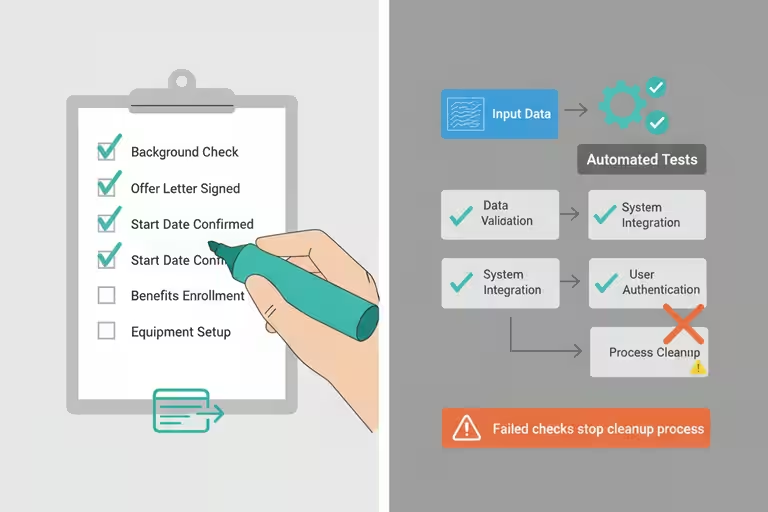
A test is a small program that checks one specific thing. “When this input comes in, this output should come out.” We write tests before we clean up code, run them after, and if they all pass, we know the cleanup didn’t break anything. If one fails, we know exactly what broke and where.

For a business owner, the practical point is this: if you’re going to trust AI automation with anything important, like customer communications, scheduling, or estimates, you need a way to verify that the automation is still doing what you think it’s doing. Tests are that verification. Without them, you find out something broke when a customer tells you. With them, you find out before anyone sends an email.

We added a meaningful number of tests this week to code that had been running in production without them. It’s the kind of work that doesn’t feel urgent until it suddenly is.

A small business automation example: email that files itself

While we were doing the cleanup sprint, we also shipped something that has nothing to do with code tidiness but is a good example of AI automation for a small business that earns its keep quietly: automatic email-to-record linking.

Before this, an email from a customer about a job would land in the inbox and someone had to drag it to the right folder, paste the key parts into the CRM, or just try to remember what was said. Ten ongoing projects means ten chances to miss something.

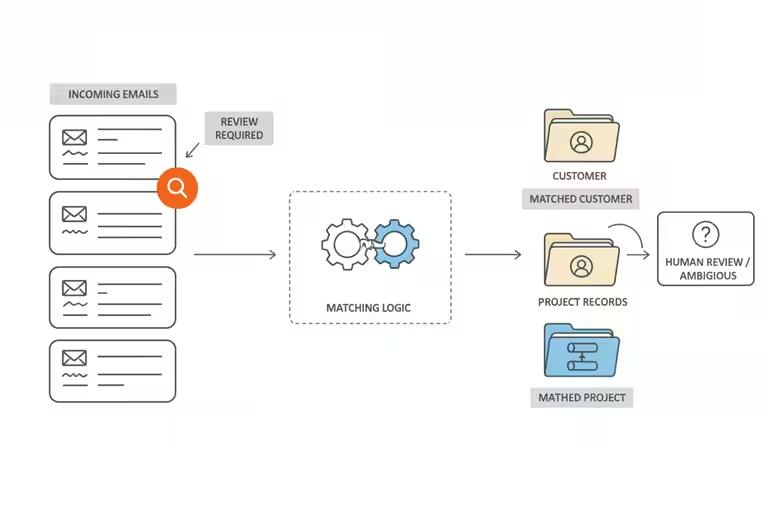
Now the system reads incoming email, figures out which customer and which job it’s about, and attaches it to the right record automatically. Open a project in the CRM and the relevant thread is already there. No filing, no copy-pasting.

It doesn’t do anything a diligent office manager couldn’t do manually. But it does it on every email, every time, without forgetting. That consistency is the whole point.

Good AI workflows beat chasing every new release

It is almost scary how fast the AI coding tools are improving. I have used tools that feel close to zero-code for certain jobs, and that would have sounded like science fiction not very long ago.

But the teams getting real value from AI tools are not the ones jumping to whatever launched last Tuesday. They’re the ones who picked a set of tools, got good at using them, and built the cleanup habit around them.

The cleanup work we did this week, testing, consolidating, removing AI-generated clutter, applies regardless of what model is running. Habits matter more than the latest release. A tidy, well-tested automation on a good-enough model will outperform a messy, untested one on the newest model.

AI code cleanup still takes a human eye

Cleanup takes real time. I spent the better part of a week on it, and that’s a week I wasn’t shipping new features. That’s the right call, but it’s a call that requires discipline. The pressure to keep adding things is constant. The pressure to tidy what’s already there is quieter and easier to defer.

The automated tests caught a few things during cleanup, but they can’t catch everything. A test only checks what you thought to write a test for. Tests reduce the risk. They don’t eliminate it.

The email auto-linking isn’t right 100% of the time either. Occasionally an email attaches to the wrong record, usually when a customer mentions multiple projects in one message. We do a periodic review to catch mis-files. The automation handles the routine; a human handles the edge cases.

The rule I’ve settled on: after any AI-assisted sprint, schedule a cleanup pass before moving to the next thing. Even an afternoon spent deleting what you don’t need, consolidating what’s duplicated, and writing one test for the thing that would hurt most to have break silently pays back more than it costs.

The robot builds fast. Cleaning up after it is still your job.

Categories
Flow

AI phone answering for contractors, with a human handoff

A few weeks back we got a call from a pool builder. He was on-site, asking about spec details for one of our waterfall systems. It was the kind of question where getting it wrong means someone orders the wrong thing and a job gets delayed. He was standing about ten feet from an excavator.

Our AI phone assistant picked up. And then, for a long moment, it could not figure out what he was saying.

It wasn’t a disaster. He called back, got a person, got the answer. But it stuck with me. Pool builders and landscape contractors don’t call from quiet offices. They call from job trailers with compressors running, from trucks on the highway, from backyards where a crew is cutting block. If your AI phone answering system can’t handle that, it’s not useful for the people you most need to reach.

That was the starting point for a round of upgrades we pushed through this month.

AI phone answering starts with better audio

The first fix was noise cancellation on the audio side. Before the AI assistant ever tries to understand what a caller is saying, the audio gets filtered. Background noise, wind, machinery, anything that’s consistent and predictable gets stripped out before transcription starts.

Transcription is the step where spoken audio becomes text, and it’s where most voice AI fails. Once you have clean text, the AI can actually figure out what someone wants. But if the input is half-static and half-words, the transcription is garbage and everything downstream is a guess.

We also upgraded the speech-to-text engine itself. The practical result is that the assistant handles noisy jobsite calls noticeably better. Not perfectly. A nail gun at close range is still a nail gun. But well enough that calls which were previously failing are now going through cleanly.

The key feature is knowing when to hand off

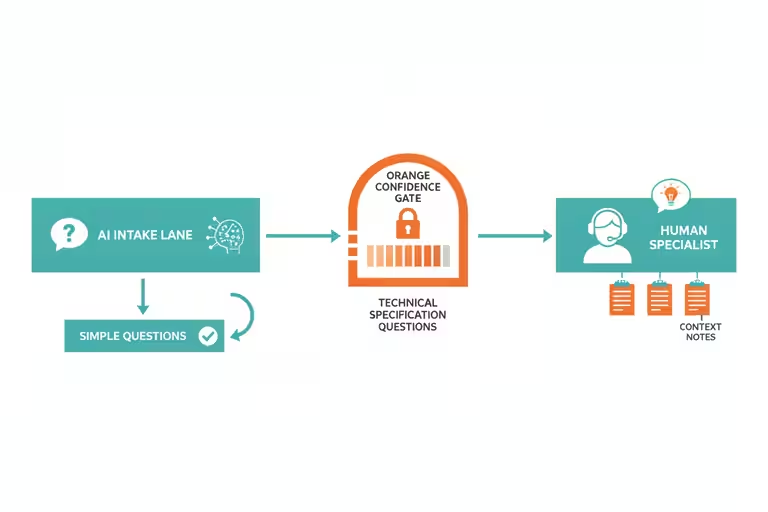
Here’s the thing about AI phone assistants that most demos don’t show you. A well-designed AI can answer a lot of common questions well: hours, pricing tiers, basic product specs, how to schedule a callback, where to find information on the website. It can take a message with the right details. It can book a time slot.

But a contractor asking a technical specification question under time pressure is a different situation. The wrong answer there doesn’t just fail to help. It actively causes a problem.

What we built is a human handoff system. The AI assistant knows its own limits. When a call goes past what it can handle confidently, like a detailed technical question, a scope-of-work discussion, or anything where a wrong answer has real consequences, it routes the call to the right person on our team, with context about what was already discussed.

The caller doesn’t start from scratch. The assistant summarizes what it captured so far, the specialist picks up mid-conversation, and the whole thing feels like one call instead of two. The AI handled what it could. A person handled what it couldn’t. Nobody guessed.

This is the part of voice AI that I think matters most for contractor businesses. The value isn’t in having a robot try to answer every question. It’s in making sure the right questions reach the right people without falling through the cracks.

Searchable meeting transcripts for contractor teams

We also wired up a separate but related piece: the conference room mic and meeting transcription. We have a small hardware setup, just a dedicated mic and a button to start recording, that captures our internal meetings and produces a speaker-labeled transcript. The AI figures out who said what based on voice patterns, and the result gets stored where anyone on the team can search it.

The reason this matters for a small shop is simple. We have four or five people who need to know what was decided in a meeting they didn’t attend. Before this, someone took notes. Sometimes the notes were good. Sometimes they were a few bullet points that made sense in the moment and nothing three days later. Now the full transcript is searchable, and if someone needs to find the exact thing Chuck said about the Henderson project, they can find it in about thirty seconds.

Trades and contractor businesses run on verbal decisions. Job change orders get discussed on-site and sometimes never make it to paper. Having a searchable record of what was actually said isn’t a luxury. It’s the kind of thing that prevents real disputes.

Where AI call routing is useful for the trades

If I were explaining this to another contractor, I would not start with the AI part. I would start with the missed-call part. A builder calls after hours. A homeowner calls while you are on a job site. A supplier calls with a question that needs to land with the right person. Those are real moments where work gets won, lost, or delayed.

Phone answering fits squarely in that category. A missed call from a builder who’s deciding between two waterfall vendors is a real cost. An AI answering service that picks up, gets the basic information, and either handles the question or routes it correctly, that’s the whole job.

What AI phone answering can’t fix on its own

A handoff only works if the right human is available to receive it. We set ours up with fallback routing, but there are still calls that go to voicemail because everyone is out in the field. The AI can’t conjure a person who isn’t there.

Meeting transcripts are also not perfect. The speaker identification works well most of the time but occasionally attributes a line to the wrong person, especially when two people speak at the same time or someone is remote on a phone line. We spot-check important transcripts before treating them as the record of record. They’re a first draft, not a court document.

And none of this changes the fact that for certain calls, like complex estimates, scope negotiations, or anything with a difficult customer, a person needs to handle it from the start. The AI assistant is good at coverage and triage. It’s not good at nuance, and we don’t ask it to be.

If you’re thinking about voice AI for your business, the practical test is this: call your own number from a loud location. See what happens. If the AI can’t hear you, it can’t hear your customers either. That’s the first thing to fix.

Categories
Flow

Renting cloud GPUs for AI video by the hour

At some point last year I looked up what it actually costs to run AI video processing on hardware you own. A workstation spec’d for serious AI video work – the kind that handles upscaling and frame interpolation without turning into a space heater – runs $8,000 to $12,000. That’s before you factor in that it would sit idle for most of the year. Most of our video projects are assisted with AI, but not fully generated using AI. The math does not work for a small contractor.

The computing power AI video needs is genuinely enormous. When I tried running an upscaling job on my regular laptop, the fan spun up like a jet engine and the machine was unusable for anything else. Two hours in, the job was maybe a third done. I killed it. That’s not a workflow – that’s an obstacle.

The problem isn’t that the tools don’t work. They work well. The problem is that the hardware underneath them is built for studios and research labs, not for a shop that wants to polish forty minutes of jobsite footage before a client presentation. Nobody running a waterfall, pool, or landscape business is going to drop five figures on a workstation they’d use twenty times a year.

Cloud GPU rental works like renting a lift

Cloud GPUs work like equipment rental. A GPU, short for graphics processing unit, is the specific kind of chip that handles heavy video and AI work. The big tech providers have warehouses full of them, and they’ll let you use one for an hour or a day, then hand it back.

We hooked our AI video pipeline into a remote job broker. That’s a piece of software that takes a heavy task, sends it to a rented GPU in a data center somewhere, runs it, and ships the finished file back to us. The whole thing looks like a button click on our end. We pay for the compute time we actually used. For a forty-minute AI video upscaling job, that’s a few dollars, not a few thousand.

AI upscaling takes a lower-resolution video and rebuilds it at higher quality using pattern recognition. The model has seen enough video to make educated guesses about what the missing detail should look like. Frame interpolation adds smoothed frames between the original ones, so slow-motion footage looks cinematic instead of choppy. Neither one is magic, but both are real, and the results are good enough to put in front of clients.

We also do AI thumbnail generation and SEO scoring for our YouTube channel through the same setup. The video marketing work that used to take a morning now runs overnight in the cloud while nobody’s watching.

Why we test AI automation in a sandbox

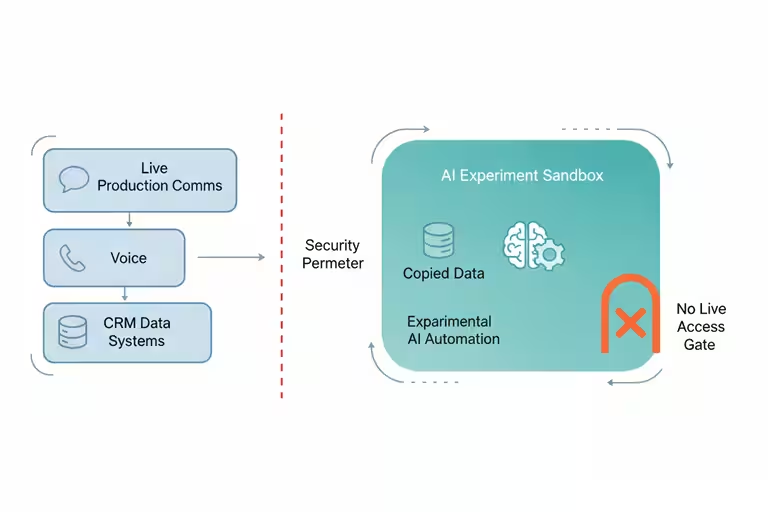
The other thing we built around the same time is what I call a sandbox, and rented GPUs are part of what makes that practical. A sandbox is a separate environment where the AI can try things without touching the actual business systems. Instead of buying hardware for experiments that might not work, we can rent the compute for a test, run the job away from production, and shut it down when we’re done.

Think of it like this. You have a real kitchen where you prep food for customers. You wouldn’t test a new recipe using the same station where tomorrow’s orders are staged. You’d use a separate prep area, or come in on a Sunday when the restaurant is closed. The sandbox is that separate prep area, but for software.

When we want to try a new AI automation, whether that’s a new way to draft proposals, a new way to route incoming calls, a video model, or anything that might behave unexpectedly, we run it in the sandbox first. For heavier tests, that sandbox can use a rented GPU just like the video pipeline does. It has its own copy of the data it needs, its own services, no connection to the live CRM or the real phone system. If it does something wrong, it does something wrong in a corner nobody can see, and we are only paying for the compute while the test is running. We review the results, tweak the settings, and only then move it to production.

The reason this matters is that AI tools are genuinely useful and genuinely unpredictable in roughly equal measure. An AI assistant that can draft a solid follow-up email can also, under the wrong conditions, send one to the wrong person. The sandbox is the rule we made so that “wrong conditions” means “caught in testing,” not “already in a customer’s inbox.”

What cloud AI tools mean for a small business

For us, the practical payoff splits into two pieces.

The video side means our marketing footage actually gets used. We had a backlog of good jobsite video that was too rough to publish. The cloud GPU pipeline cleared it out over a couple of weekends without anyone sitting at a computer. The finished clips go on the website, on YouTube, in proposals. Good waterfall video sells waterfalls.

The sandbox side means we move faster on experiments without lying awake about what might go wrong. Before we had it, every new automation felt like a judgment call about risk and hardware commitment. Now the rule is simple: new things go in the sandbox, rented compute handles the heavy test, and tested things go in production. That structure made it easier to say yes to new ideas and easier to explain to Chuck what we were building and why.

Where cloud GPU jobs still need a safety net

Cloud GPU work needs a solid internet connection and a pipeline that knows what to do when a job fails midway – which happens. Our setup retries automatically, but if you’re running a one-off job with no error handling, a dropped connection means starting over.

The sandbox also isn’t a substitute for actually reviewing what the AI does. It catches catastrophic failures, the kind where something clearly went wrong. It doesn’t catch subtle errors, like an AI that’s technically doing the right thing in the wrong context. A human still has to look at the output before it ships. We check the video before it goes on the website. We review the AI responses before they go live. The sandbox just means the review happens on our schedule, not after a customer already saw something we’d rather have caught.

The AI space is busy right now. There are free trials, promos, new tools, and demos everywhere. What I’ve found is that the tools we use every week pay off, and the tools we tried once and forgot are just clutter. For us, AI video cleanup and thumbnail work made sense because we already had the footage and a real place to use it. That is the test I would use before signing up for anything: do I have a real workflow for this, or am I just curious?

If you have a backlog of real work and there’s an AI tool that can help, that’s a good place to start. It’s fun to try things out and learn what’s new in the AI world, but at the end of the day AI is only valuable if it’s doing valuable work. The compute is there. You just don’t have to own it.

Categories
Flow

AI costs for small business: keep the meter under control

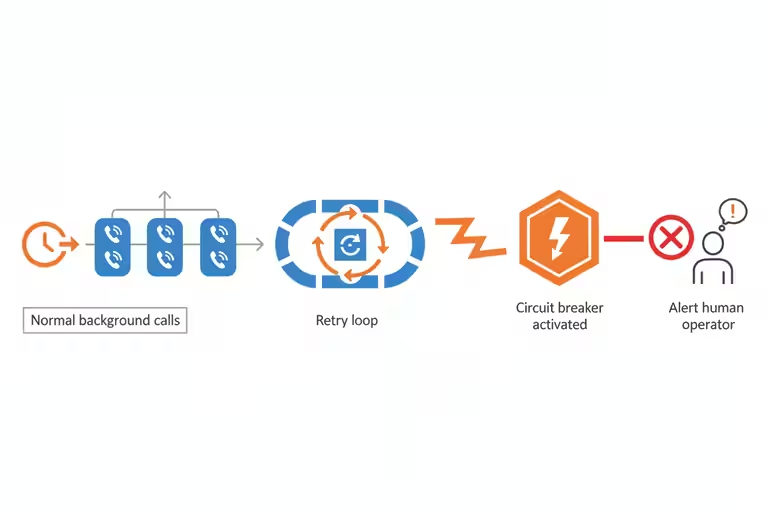
Early April, we noticed something in our usage logs: one background worker had been running a processing loop through the night, making AI calls far faster than it should have. By morning it had burned through a significant chunk of our weekly budget. The rest of the platform was fine, but we were suddenly rationing.

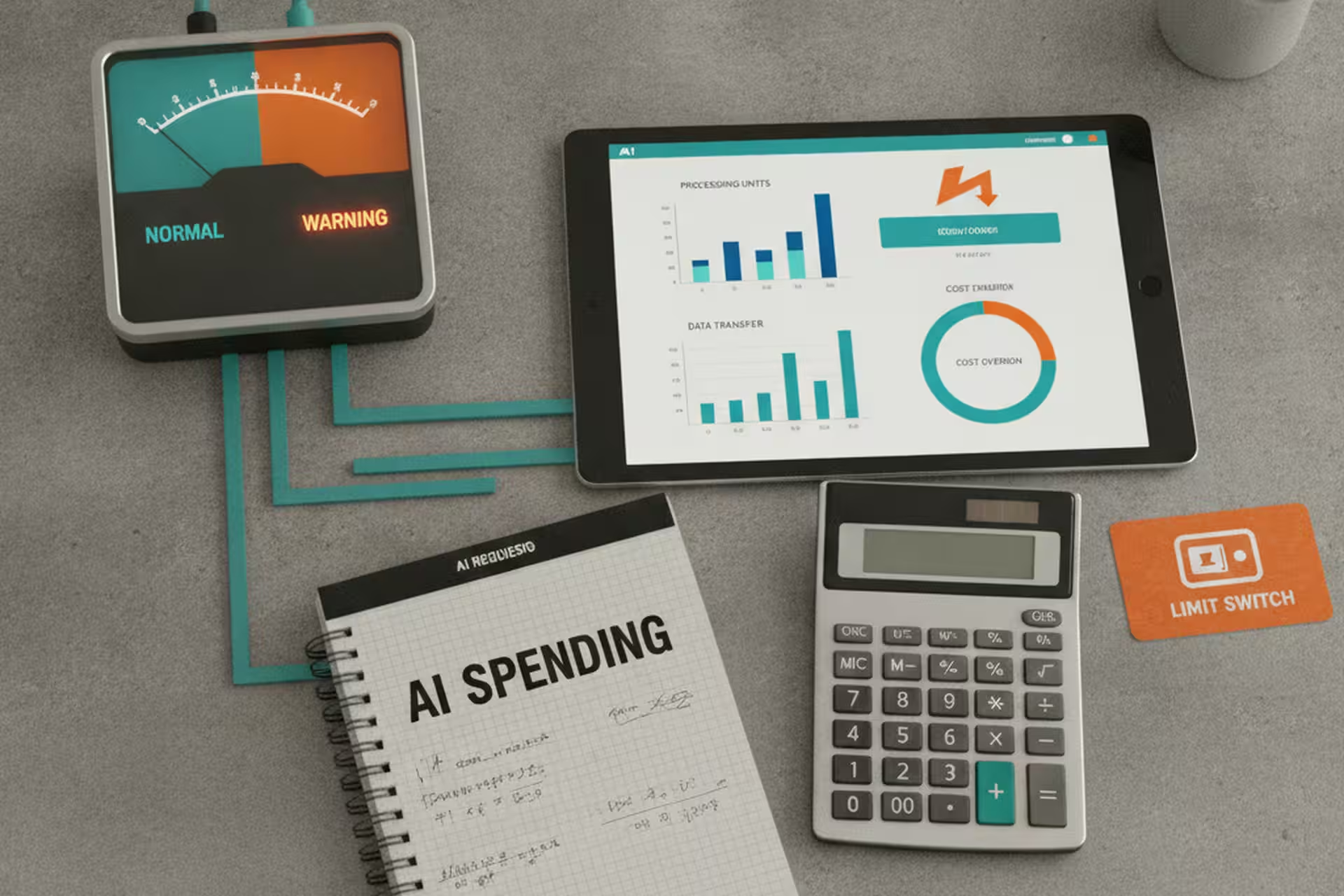
That’s the version of the AI cost problem that doesn’t show up in the demos. Not “AI is expensive to buy” – the tooling is pretty affordable now. The problem is that AI calls are metered like water or electricity, and without the right setup, a small business owner may not know the meter is running until the bill comes.

How AI pricing becomes a metered bill

Most people’s first experience with AI pricing is a subscription like ChatGPT Plus. That is the easy version to understand: you pay a flat monthly price for the ChatGPT web app, then use it inside the limits of that plan. At the time I’m writing this, OpenAI lists ChatGPT Plus at $20/month.

Business automation usually works differently. When software calls an AI model through an API, that API usage is separate from the ChatGPT subscription and is billed independently. The bill is usually based on tokens. A token is a small piece of text. The text you send into the model is input tokens; the answer the model writes back is output tokens. OpenAI publishes API prices per million tokens, with separate rates for input and output.

That difference matters. Typing into ChatGPT feels like using a subscription. Wiring AI into a background worker feels more like turning on a meter. If a job sends a long customer history, a pile of email threads, or a database export, the input tokens can be large before the model writes a single word back. If the response is a long report, the output side grows too.

The problem is volume. If you have an agent that runs nightly and processes a hundred records, that’s a hundred calls. If that agent has a bug and processes the same records ten times each, that’s a thousand calls. If it runs into an error and retries in a tight loop, it can make ten thousand calls before anyone notices. At that point, the affordable AI starts looking different.

Put every AI call through one gateway

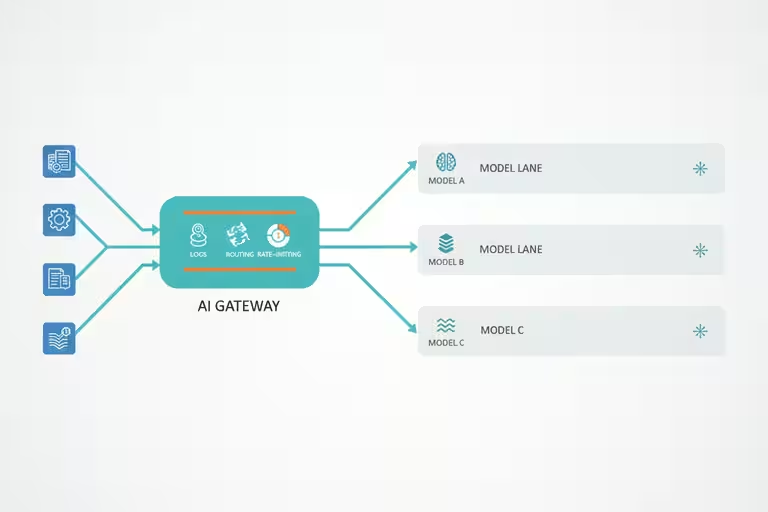
The single most useful thing we did was route all AI calls through one gateway – one piece of software that every request passes through before reaching the model. Think of it like a dispatcher at a trucking company. Nobody goes directly to the driver. Every job goes through the dispatcher, who logs it, assigns it, and tracks whether it got done.

With a front door like this, you can see at a glance which parts of your system are making calls and how many. You can set rate limits. You can stop a runaway worker without taking down everything else. You can also apply different rules to different types of work. That’s where the next few dials come in.

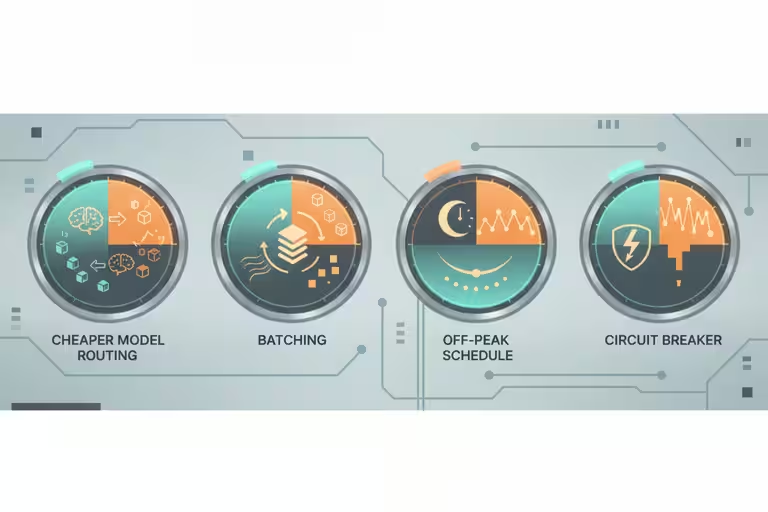
Four AI cost controls that actually move the meter

Route simple tasks to cheaper models. Not every job needs the most capable AI available. If you’re classifying whether an incoming email is junk or a real lead, a smaller, faster model costs a fraction of the price and works almost as well. We push classification, labeling, and formatting work to lighter models, and save the heavier ones for things that actually need them: drafting a proposal, generating a response that represents the company, handling a complex phone inquiry.

Batch multiple items per call. If you have twenty emails to screen, sending them one at a time means twenty calls. Sending them together in a single call with the right instructions means one. Not every task batches cleanly, but when it does, the savings are real.

Add circuit breakers. A circuit breaker is a rule that says: if this worker makes more than X calls in Y minutes, stop and alert me. It’s the equivalent of a breaker panel in an electrical system. When something goes wrong, it fails loudly and stops, rather than running quietly until the bill arrives.

The return-on-investment math, honestly

I talk a lot about the value of these tools because the value is real. A $20-a-month AI account can do things that feel ridiculous compared with what software used to cost. But that does not mean AI is automatically cheap once you wire it into a business process.

Here is the kind of math I mean. As of this edit, OpenAI lists GPT-5.5 API pricing at $5 per million input tokens and $30 per million output tokens for standard short-context calls. Suppose a useful daily review job uses 500,000 tokens each run: 360,000 input tokens and 140,000 output tokens. That is $1.80 on the input side and $4.20 on the output side, or $6 per run. Run it twice a day and it is about $12/day. Over a 30-day month, that is $360.

$360/month may be a great deal if the work is worth more than that. If the review saves several hours of office time, catches missed leads, or prevents a real operational problem, the cost is easy to justify. The question is not whether the AI bill is zero. The question is whether the job it is doing is worth more than the meter it runs.

Now flip the example. A similar 500,000-token job on a more expensive model, or one that produces much longer output, can cost a lot more. Using GPT-5.5 Pro rates from the same pricing page, a 500,000-token run split evenly between input and output would be $7.50 for input and $45.00 for output, or $52.50 per run. Run that once a day and you are at $1,575/month. If nobody reads the report, approves the suggestions, or turns the output into a decision, the value is zero. You didn’t buy automation; you bought an expensive pile of unread text.

The honest return-on-investment math is not “AI saves X per month.” It is “AI saves X per month if you run it cleanly and use the output.” A single misbehaving worker, or a perfectly functioning worker that nobody looks at, can flip a sensible budget into an ugly one faster than you would expect. Cost discipline is part of the return, not a separate accounting chore.

What AI budget controls won’t do on their own

Circuit breakers and rate limits don’t configure themselves. Getting value out of a usage dashboard requires someone who understands the system well enough to know which numbers should concern them. For a small shop, that might mean a monthly review of your AI vendor’s billing dashboard, looking for any line that jumped unexpectedly.

Worth naming too: if you’re using AI tools you didn’t build yourself (which is most small businesses), you may not have direct access to the usage data. Ask your vendors. A good AI tool for a small business should show you, at minimum, call volume per month and whether there are any anomalies. If they can’t tell you that, it’s worth asking why.

What I’d do before adding the next AI tool

Before you add any new AI feature to your business, estimate how many times it will run in a day. If it runs once per customer inquiry and you get ten a day, that’s ten calls. If it runs on every incoming email and you get a hundred emails a day, that’s a hundred calls. Write the number down. Then check whether your AI vendor’s pricing makes that sustainable at the volume you’re actually planning for – not just the volume you have today.

That five-minute exercise has saved us from a few decisions that would have looked a lot different at the month-end invoice.

Categories
Flow

How we use AI to review our small business automation

I came in one morning to find that our AI had filed 1,004 improvement tickets about our small business automation while we slept.

That number stopped me cold. A thousand suggestions – about its own performance, its own gaps, things it thought should work better. Most of them were probably fine ideas. None of them were going to get built automatically. That part is entirely up to us.

That’s the setup for this post: not “AI improves itself,” but “AI proposes, humans decide.” The distinction matters more than it sounds if you are using AI tools around real customers, schedules, email, or job records.

What our AI review system actually does

The tool is something we call the Program Improvements Manager, or PIM. Every night, it runs a review pass across the AI systems we’ve built: voice agents, email tools, the CRM integration, the scheduling app. It looks for patterns: things that failed more than once, places where a response was slow, steps that a human had to correct, areas where the output was inconsistent.

Then it writes up suggestions. Each one gets a rough estimate of effort and a rough estimate of impact. They get sorted into categories: reliability improvements, new capability requests, content updates, configuration changes.

By morning, we didn’t have 1,004 raw suggestions. We had 129. That was better, but it was still too many. It was not practical to sift through 129 active improvement suggestions every day and make good decisions about all of them.

That became the real lesson: the system had to be tuned for usability, not just output. A review tool is only useful if the queue is small enough that a person will actually read it. You do not want AI doing a million things if all but a few get stuck in a human review backlog.

That human is me, usually. I review the queue, decide what is worth building, and tune the system when the list starts turning into noise. Some suggestions go into our actual development backlog. Most get noted and watched. A few get dismissed. Nothing happens automatically.

The best use of AI here is not as a magic box for every shiny new idea. It is a tool to reduce work we were already doing. If it overwhelms us with a pile of crap we will never get a chance to look at, it has failed, even if every individual suggestion sounds clever.

Why human approval is the whole point

An AI that can modify its own behavior without oversight is a liability. I’m not being dramatic about that. It’s just true. The value of an AI self-review system like this is not that it fixes things on its own. The value is that it sees things I would miss, at a speed and scale I can’t match, and hands them to me in a form I can actually act on. The judgment call stays with me.

The analogy I keep coming back to is a good estimator who reviews all your past jobs and writes up a report: here’s what came in under budget, here’s what ran over, here’s a pattern I’m noticing. That’s genuinely useful. But the decisions about how to bid the next job, which crew to put on it, when to take a pass – those stay with the person who signs the contracts.

Same idea here.

Nightly backups make the automation safer

The same night the PIM runs, a set of backup jobs runs too. Every customer recording, every voice-agent transcript, every video gets quietly copied to cloud storage. Not because anything bad happened, but because “automated backups run every night” is the kind of boring sentence that prevents years of work from disappearing.

I don’t think about it most days. That’s the point.

A few weeks back I was looking at the backup logs and noticed they’d been running without a single gap for over a month. Thousands of files, dozens of sessions, completely automated, no one watching. That’s the kind of automation I actually trust. Not because it’s clever, but because it’s predictable.

Why AI process improvement is practical now

One reason this is practical now is that the AI tools have gotten cheap enough for normal business experiments. In the videos I’ve made about AI, I keep coming back to the same point: a lot of this is not five-figure enterprise software anymore. Sometimes it is a $20-a-month tool, or a small metered cost, doing a job that would have taken a person hours.

That does not mean everything should be automated. It means the math is finally good enough that a small company can try things, keep what works, and shut off what does not.

This only works if someone reviews the queue

An AI that writes its own improvement tickets is only as good as the person who reads them. If the queue piles up unreviewed for weeks, or if the person reviewing it doesn’t understand the systems well enough to evaluate the suggestions, you get noise. Or worse, a false sense that the system is improving itself when really it’s just generating paperwork.

This approach works for us because I’m close enough to the code and the business logic to make calls quickly. For a shop owner who doesn’t build their own tools, the right version of this might just be a monthly review session with whoever manages your software vendors. Periodic review by a person who can act on it matters more than the specific implementation.

One place to start

If you’re building any kind of automation, build the review step first. Not as an afterthought. Decide ahead of time: how will I know if this is working? How will I know if it’s quietly doing the wrong thing? The answer doesn’t have to be sophisticated. It can be a weekly email summary, a log you glance at on Mondays, a number that should stay below a threshold. Just something a human actually reads.

Categories
Flow

Why your small business emails land in spam

We spent a Friday afternoon building out a small business email campaign for Aquatic Artists – wrote decent copy, put together a clean template, hit send to a list of a few hundred contacts we’d accumulated over years of doing business. Then we waited.

Almost nothing came back. No opens worth counting, no replies. A few days later, I started getting the occasional “never got your email” from people I knew well. The emails hadn’t bounced. They’d gone straight to spam.

That’s a deflating experience. And it’s not rare. If your contractor emails, service reminders, or marketing emails keep going to spam, here is what I learned about why it happens and the fixes we put in place.

Email authentication: the part most small businesses skip

Most small businesses set up an email address, maybe connect it to a domain they bought, and assume it’s ready to go. The problem is that spam filters run a series of background checks on every message before it reaches an inbox. Three of those checks matter most:

SPF is a record you publish for your domain that says “these are the servers allowed to send email on my behalf.” If your email goes out through a service that isn’t on that list, spam filters treat it as suspicious. Think of it like a contractor showing up to a job site without being on the authorized crew list.

DKIM is a cryptographic signature attached to your message – a way of proving it wasn’t tampered with in transit. Most email platforms add this automatically, but only if you’ve set it up correctly in your domain’s settings.

DMARC tells receivers what to do if SPF or DKIM fail: quarantine the message, reject it, or just report it. Without DMARC, even a properly signed email can end up treated inconsistently.

None of this is exciting. Setting up SPF, DKIM, and DMARC is mostly a couple of hours in your DNS settings and your email platform’s configuration panel. But it’s the foundation that everything else depends on.

Plain-text email helps deliverability

Here’s one that surprised me. If you send a marketing email that’s only HTML – a nice-looking newsletter with images and formatting, but no plain-text version alongside it – spam filters often mark it down. Real communication between people almost always has a plain-text component. A message that’s pure HTML looks like it came from a bulk-sending machine, not a person.

When we built our email template editor, we made it generate both versions automatically. Every campaign goes out with a proper HTML design and a plain-text fallback. It takes zero extra effort and removes one more reason a filter might catch your message.

Domain warming for business email

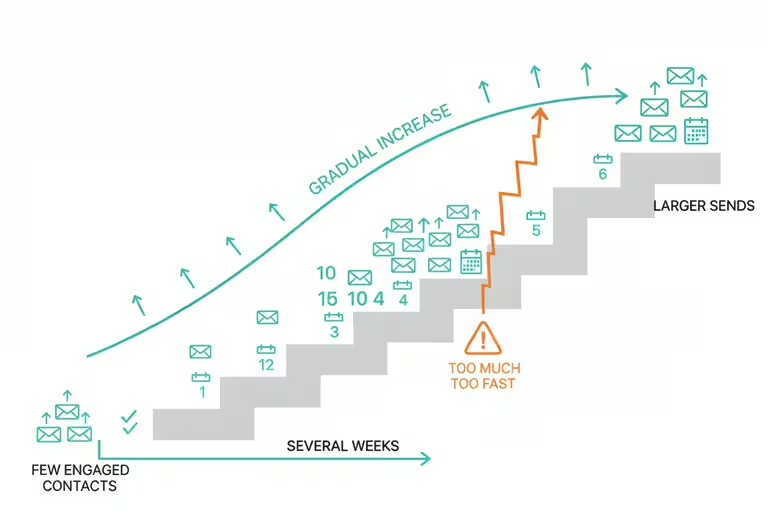
If you’ve never sent marketing email from a domain before – or haven’t sent much – spam filters are going to be cautious about you. You don’t have a reputation yet. The fix is to build one slowly: start by sending small batches to your most engaged contacts (people who actually open and click), then increase volume over several weeks. This is called domain warming, and it’s genuinely boring. There’s no shortcut.

Double opt-in helps here too. When someone signs up to hear from you and then confirms that signup with a second click, you know they actually want your emails. That keeps your complaint rate low, which keeps your sender reputation healthy.

Where AI helps with email marketing

Once the plumbing was working, we added two things that make the system smarter.

First, the template editor I mentioned is drag-and-drop, roughly what you’d expect from a Mailchimp-style tool, with AI suggestions for subject lines and send times based on which days and hours your audience tends to engage. Not magic, but genuinely useful when you’re doing this as one of fifteen things on your plate.

Second, we built an inbox scanner. It’s an AI tool that reads the incoming mailbox and surfaces the actual leads and action items buried in there. Not “here’s every email you got,” but “here are the three threads that look like someone wants to talk business.” For our business, that matters more than fancy automation. That is the kind of AI I like: boring, specific, and tied to a real job that used to eat time.

What email authentication alone won’t fix

Authentication fixes are necessary but not sufficient. If your content looks spammy – all-caps subject lines, aggressive promotional language, sending to people who never asked to hear from you – you’ll still land in filters regardless of your DKIM record. And domain warming takes weeks. There’s no fast version.

The other rule we follow is simple: do not use AI as an excuse to send vague, pushy, or unwanted messages. If the email would annoy you as a customer, making the computer send it faster does not improve it. It just scales the mistake.

What I’d check first

If you’re not sure whether your domain is authenticated, use a domain checker instead of guessing. Start with Google Admin Toolbox Check MX for MX/SPF checks and DKIM selector checks, MXToolbox SuperTool for MX, blacklist, SMTP, SPF, DKIM, DMARC, MTA-STS, and TLS-RPT lookups, dmarcian Domain Checker for SPF, DKIM, and DMARC inspection, or EasyDMARC Domain Scanner for a domain health scan across SPF, DKIM, DMARC, and BIMI. Run more than one if the result matters, because each tool explains failures a little differently. You’ll see quickly whether SPF, DKIM, and DMARC are configured. That’s the starting point. Fix what’s missing, then think about content and warming. The deliverability problems tend to sort out in that order.

If you’re curious how we handle email marketing for our business, reach out. Happy to share what worked.

Categories
Flow

Crew scheduling software for real-time updates

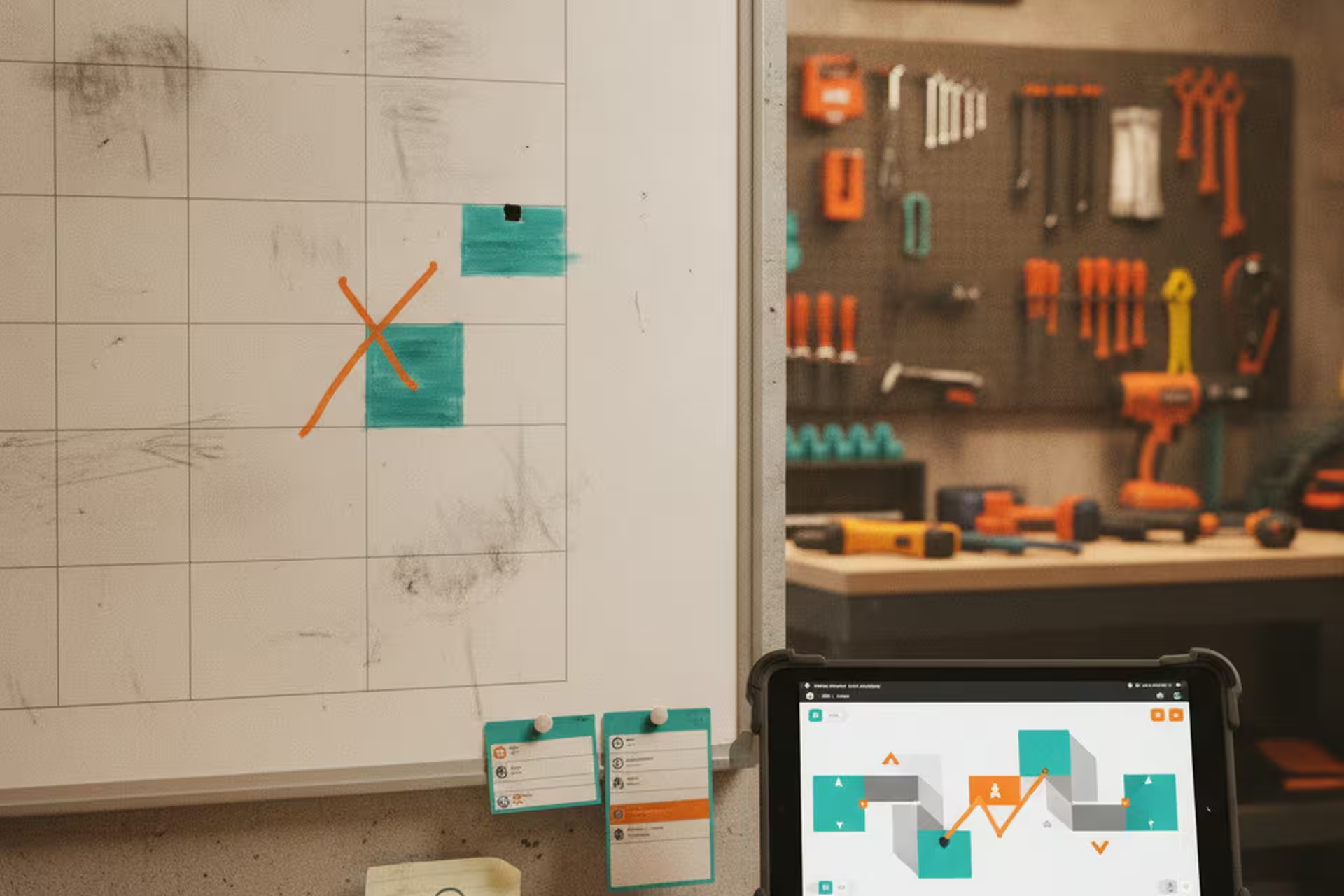
For a long time, the crew schedule lived in a spreadsheet. It worked because everyone knew where to look, but it was still a snapshot of a moving week.

The problem wasn’t the spreadsheet itself. The problem was everything that happened after the spreadsheet changed. A job moved. A crew member was unavailable. The weather pushed a pour to Thursday. Now the version someone saw earlier in the day might be wrong, and the confusion came from people working from different copies of the plan.

If you coordinate crews, you’ve lived this. It doesn’t matter if the schedule starts in a spreadsheet, a group text thread, or one person’s head. The problem is a schedule that changes often but does not update everywhere at once.

What we built for crew scheduling

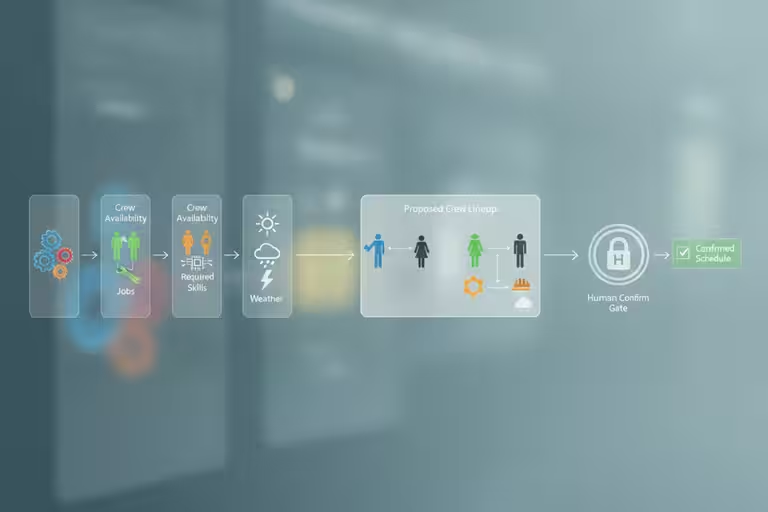
We stood up a crew scheduling app this month that covers our install crews and job assignments. At its core it’s not complicated: jobs get entered, crew members are in the system with their availability, and the app assigns people to jobs based on who’s free and what skills a job needs.

The “auto-scheduling” part means the app can suggest a crew assignment – it looks at who’s available, who’s already booked, and what each job requires, and it proposes a lineup. You still review it and confirm. It’s not the app making the final call; it’s the app doing the tedious matching work so you’re reacting to a draft instead of building the whole thing from scratch.

That distinction matters. People hear “auto-scheduling” and picture software that runs the whole operation without them. That’s not what I’m describing. The version that actually works for us is: the software handles the obvious assignments, surfaces the conflicts, and leaves the edge cases for human judgment.

I do not put much weight in average numbers for this kind of thing, because every operation runs differently. What I do know is simpler: if the schedule changes frequently and the current version is not visible to everyone who needs it, the business is going to keep paying for that with confusion and missed details.

The spreadsheet sync that made the switch painless

The main lesson from our rollout was simple: don’t throw out the old spreadsheet on day one.

We kept our Excel spreadsheet running alongside the new app for the first few weeks. The two systems sync in both directions – a change in the app shows up in the spreadsheet, and an update in the spreadsheet (for whoever hadn’t switched to the app yet) feeds back into the system.

That two-way sync changed the dynamic of the rollout completely. People who were nervous about the new tool didn’t have to trust it immediately. They could keep doing what they were doing while the rest of us used the app, and the schedule stayed consistent across both. Over time, as the app proved itself, the spreadsheet became the backup rather than the primary. By the time we stopped updating it manually, nobody noticed.

The principle generalizes. Almost any time you’re moving a team off a tool they’re used to, the hard part isn’t the software – it’s the trust. They’ve been burned by systems that launched with fanfare and then broke at the wrong moment. The way to earn that trust is to not ask them to abandon the old system as a condition of trying the new one. Let both run. Let the new one prove itself. Then the transition happens naturally.

What the scheduling app changed day-to-day

The clearest win is that the schedule reflects changes as they happen.

Before, the spreadsheet could be correct at 8 a.m. and stale by lunch. A job moved, availability changed, weather shifted the plan, and people were suddenly working from different versions of the week.

Now the contractor schedule is a shared live view. Crew members can check the current plan themselves. Changes are visible immediately. When a job pushes to the following week, one update propagates everywhere. The value is not that nobody asks questions anymore; it is that everyone starts from current information instead of an older spreadsheet.

Where auto-scheduling still needs a human

Auto-scheduling only knows what you put in it.

If a crew member updates their availability in the app, great – the system handles it. If someone mentions a change and nobody logs it, the schedule is wrong and the app doesn’t know. If a truck breaks down and no one updates the job status, the auto-assign will keep sending that truck out. Garbage in, garbage out – a rule that applies just as much to scheduling software as it does to everything else.

The other thing: scheduling software doesn’t fix a chaotic operation. If your jobs are poorly scoped or crew assignments change last-minute because of upstream planning problems, an app will reflect that chaos clearly. That can be useful – it surfaces problems that were previously invisible – but don’t expect the tool to solve problems that live in the process, not the calendar.

If your crew schedule changes faster than the spreadsheet

You don’t have to rebuild your whole operation to get value out of better scheduling tools. The useful first step is simple: make the current schedule visible to the people who need it, and make updates flow to one shared place quickly.

Start with two questions. Where is the current version of the schedule, and what happens when jobs or crew assignments change during the day? If the answer depends on someone remembering to reconcile a spreadsheet later, you’ve found the friction point. Even a basic app that lets more people see the latest schedule can reduce confusion before you add anything more advanced.

The spreadsheet got us by for a long time. I don’t miss trying to keep every moving part current by hand.

Categories
Flow

Website automation for Project Pages

There’s a photo on my phone of a waterfall we finished last fall. Great install. The kind of job you want on your website. I took about forty photos on-site, picked the best three, and then set them aside because getting them onto the website meant sitting down, opening three different tools, resizing images, filling in fields, writing a caption, and publishing – and I had six other things on my list.

The photos sat for two weeks.

That’s not a technology problem. That’s a friction problem. The harder you make something to do, the more often it doesn’t get done. And for a small shop, your website is your portfolio. If it doesn’t reflect your recent work, you’re leaving your best sales tool half-empty.

What publishing a Project Page used to look like

Before we built our website management system, getting a finished install onto the site went something like this: open the WordPress admin, create a new post, upload images one at a time, resize or crop as needed, write a title and description, assign categories and tags, check that the gallery template looked right, preview it, fix whatever was off, and publish. Then separately update the portfolio index.

From start to finish, about 15 to 20 minutes – on a good day, when nothing went wrong.

That may not sound like a full afternoon. But multiply it by every project we do in a year, and it adds up to a real chunk of time. More importantly, it’s the kind of task where friction wins. You do it when you have a clear desk and a focused hour. Which means it often doesn’t happen at all.

What website automation changed

We built a custom website editor that handles the whole project publishing workflow in one place. You pick the photos, the tool handles resizing and optimization, it generates a title and pulls in the project details we’ve already entered elsewhere, it sets the right template, and it publishes. The whole thing takes under a minute now.
The difference isn’t that the computer is working faster. It’s that we eliminated the switching – jumping between tools, re-entering information that already existed somewhere, hunting for the right image dimensions. The automation handles the steps that were only ever annoying busywork.

The time savings that compound most reliably for a small business are usually the boring ones. Shaving 15 minutes or more off a task you do every week. Removing the friction that caused you to skip updating your portfolio for two weeks straight. Nobody writes headlines about that, but it’s where the real time goes.

The YouTube and SEO workflow

We also built a YouTube management tool on the same principle: remove the friction from getting project content onto the channel.

The piece I find most useful is the AI thumbnail draft. When you publish a new video, the tool proposes a thumbnail based on the project photos and the title. It’s not always perfect – you still need a human eye on it before it goes live – but having a draft to react to is much faster than staring at a blank canvas and thinking about what to make. Most of the time the draft is 80% of the way there, and I’m adjusting rather than creating from scratch.
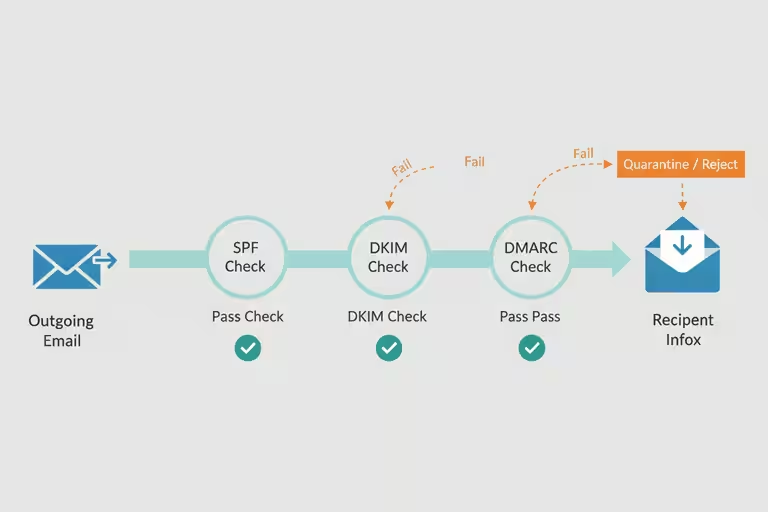
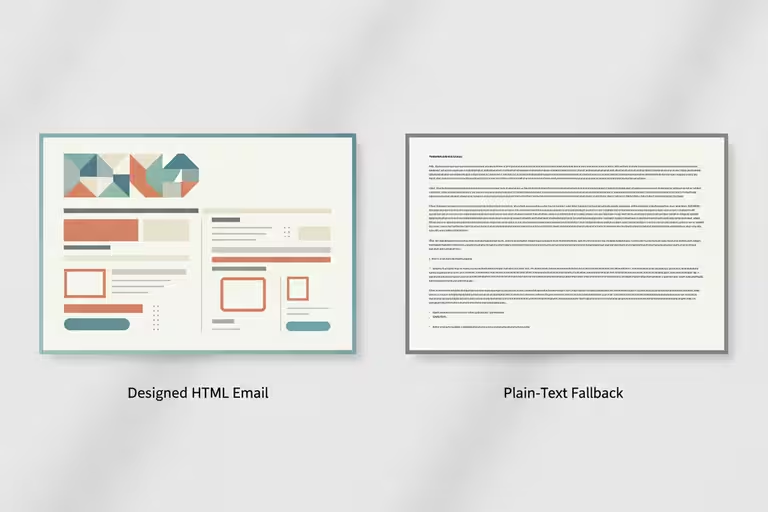
The SEO scoring layer checks the title and description against what tends to perform well in search – not in a black-box way, but by flagging specific things: title too long, description missing key terms for a Project Page, that kind of thing. Again, a guide, not an oracle. But useful enough that I actually use it instead of skipping the step because it feels like too much work.

My honest take is that you do not need to chase every AI update for this kind of work. Pick a friction point in your own operation and remove it. In our case, that meant getting good project photos out of my phone and onto the website before they got buried. Better tools help, but they help a lot more when you have already built the habit of using them.

What small-business automation still can’t do for you

Automation handles the steps that are well-defined and repeatable. It doesn’t replace judgment.

The AI thumbnail draft still needs a human look before it goes live. The SEO suggestions are starting points, not guarantees – what ranks well shifts, and a tool trained on last year’s patterns isn’t always right about this year’s. Publishing automation means nothing if the underlying content is weak or the photos are poor quality.

There’s also a real risk of automating too fast. We’ve had moments where the system published something with a formatting issue that looked fine in preview and wrong on the live page. Automation moves fast, and fast is useful only if you still have a review step before the thing is public.

The rule we follow: automate the tedious parts, keep a human eye on anything that touches the customer-facing result.

The math worth doing

If your shop does fifty Project Pages a year, and each one takes 15 to 20 minutes, that’s about 12 and a half to nearly 17 hours. Cut it to under a minute, and you’ve saved roughly 12 to 16 hours – which matters even more when you remember that those hours weren’t all in one block. They were fifteen minutes here, twenty minutes there, scattered across a year of days when you already had too much on your list.

The real savings aren’t the time. They’re the jobs that actually make it onto your portfolio instead of sitting in a folder for two weeks.

If you’re managing your own contractor website and marketing, even basic tools – a photo-resize shortcut, a template that fills in the repetitive fields – can make a real difference in whether you actually do the thing or skip it. Start with the step that causes the most friction. That’s usually where the time is hiding.